> For clean Markdown of any page, append .md to the page URL.
> For a complete documentation index, see https://docs.vapi.ai/llms.txt.
> For full documentation content, see https://docs.vapi.ai/llms-full.txt.
> For AI client integration (Claude Code, Cursor, etc.), connect to the MCP server at https://docs.vapi.ai/_mcp/server.
# Langfuse Integration with Vapi
> Integrate Vapi with Langfuse for enhanced voice AI telemetry monitoring, enabling improved performance and reliability of your AI applications.
# Langfuse Integration
Vapi natively integrates with Langfuse, allowing you to send traces directly to Langfuse for enhanced telemetry monitoring. This integration enables you to gain deeper insights into your voice AI applications and improve their performance and reliability.
## What is Langfuse?
[Langfuse](https://langfuse.com/) is an open source LLM engineering platform designed to provide better **[observability](/docs/tracing)** and **[evaluations](/docs/scores/overview)** into AI applications. It helps developers track, analyze, and visualize traces from AI interactions, enabling better performance tuning, debugging, and optimization of AI agents.
## Get Started
First, you'll need your Langfuse credentials:
* **Secret Key**
* **Public Key**
* **Host URL**
You can obtain these by signing up for [Langfuse Cloud](https://cloud.langfuse.com/) or [self-hosting Langfuse](https://langfuse.com/docs/deployment/self-host).
Log in to your Vapi dashboard and navigate to the [Integrations page](https://dashboard.vapi.ai/settings/integrations).
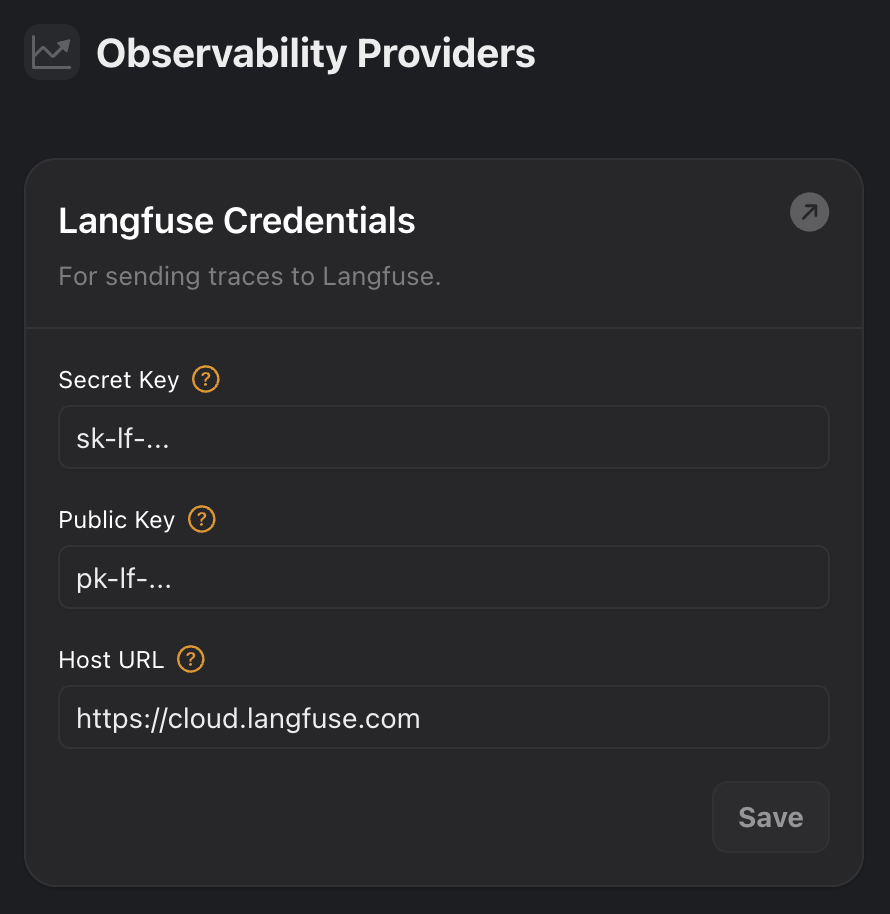
Under the **Observability Providers** section, you'll find an option for **Langfuse**. Enter your Langfuse credentials:
* **Secret Key**
* **Public Key**
* **Host URL** (US data region: `https://us.cloud.langfuse.com`, EU data region: `https://cloud.langfuse.com`)
Click **Save** to update your credentials.
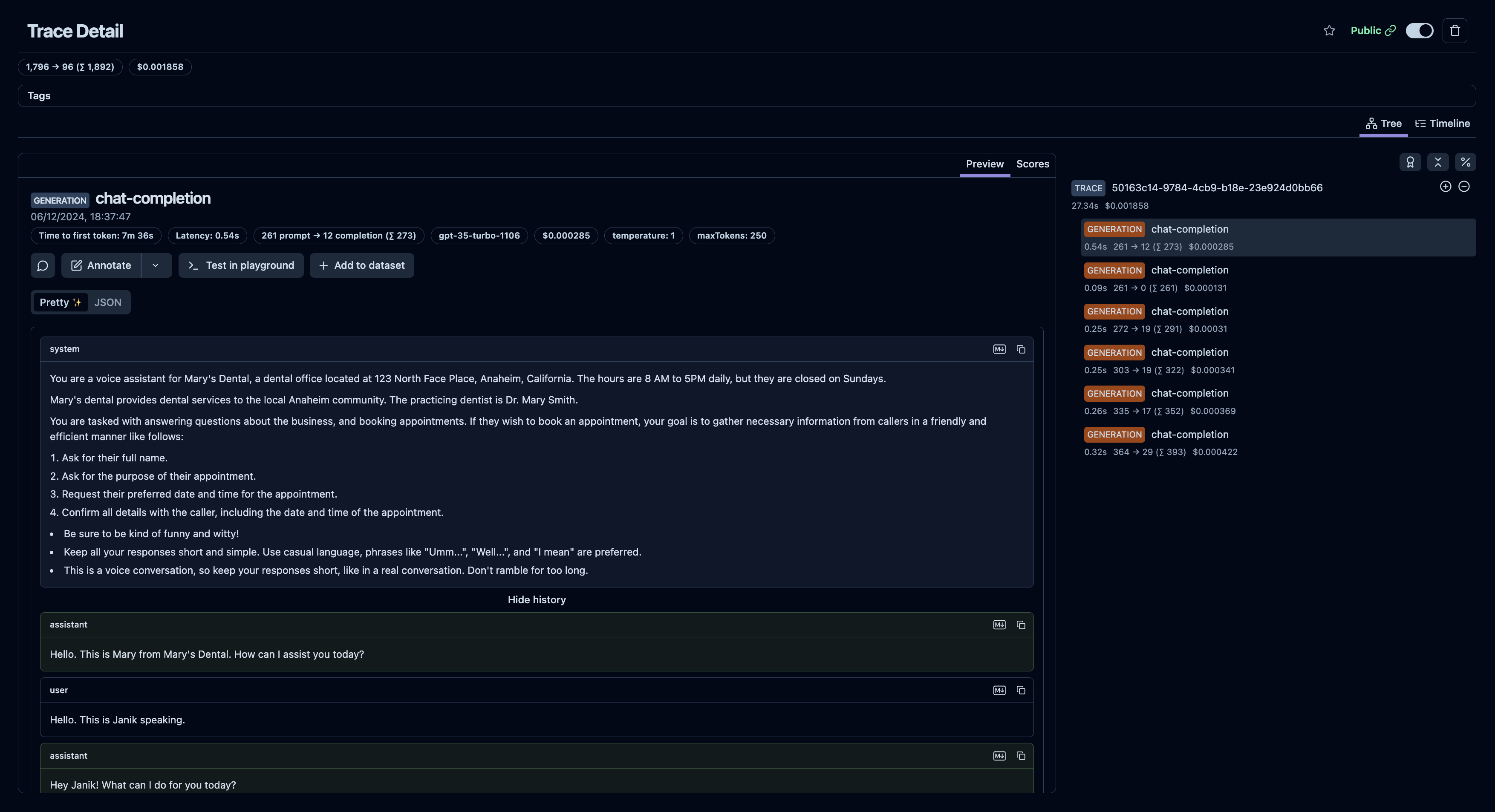
Once you've added your credentials, you should start seeing traces in your Langfuse dashboard for every conversation your agents have.
Example trace in Langfuse: [https://cloud.langfuse.com/project/cloramnkj0002jz088vzn1ja4/traces/50163c14-9784-4cb9-b18e-23e924d0bb66](https://cloud.langfuse.com/project/cloramnkj0002jz088vzn1ja4/traces/50163c14-9784-4cb9-b18e-23e924d0bb66)
To make the most out of this integration, you can now use Langfuse's [evaluation](https://langfuse.com/docs/scores/overview) and [debugging](https://langfuse.com/docs/analytics/overview) tools to analyze and improve the performance of your voice AI agents.
## Enrich Traces
Vapi allows you to enrich Langfuse traces by integrating [Metadata](https://langfuse.com/docs/tracing-features/metadata) and [Tags](https://langfuse.com/docs/tracing-features/tags).
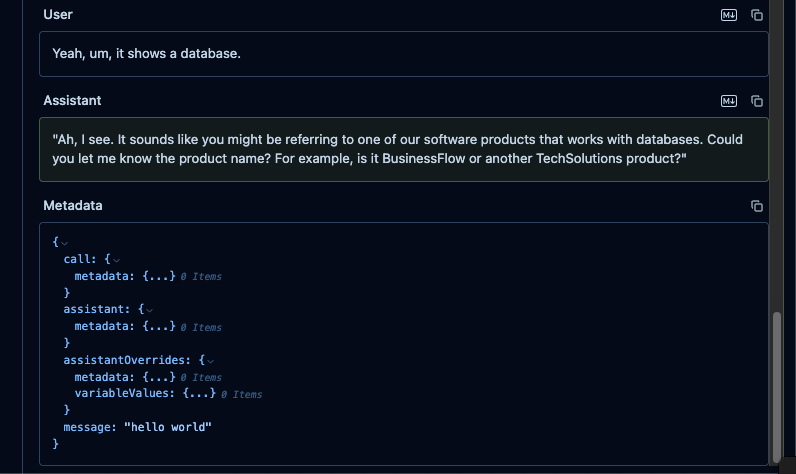
By default, we will add the following values to the metadata of each trace:
* `call.metadata`
* `assistant.metadata`
* `assistantOverrides.metadata`
* `assistantOverrides.variableValues`
### Usage
You can enhance your observability in Langfuse by adding metadata and tags:
**Metadata**
Use the [`assistant.observabilityPlan.metadata`](/api-reference/assistants/create#request.body.observabilityPlan.metadata) field to attach custom key-value pairs.
Examples:
* Track experiment versions ("experiment": "v2.1")
* Store user segments ("user\_type": "beta\_tester")
* Log environment details ("env": "production")
**Tags**
Use the [`assistant.observabilityPlan.tags`](/api-reference/assistants/create#request.body.observabilityPlan.tags) field to add searchable labels.
Examples:
* Mark important runs ("priority")
* Group related sessions ("onboarding", "A/B\_test")
* Filter by feature ("voice\_assistant")
Adding metadata and tags makes it easier to filter, analyze, and monitor your assistants activity in Langfuse.
### Example
 Once you've added your credentials, you should start seeing traces in your Langfuse dashboard for every conversation your agents have.
 Example trace in Langfuse: [https://cloud.langfuse.com/project/cloramnkj0002jz088vzn1ja4/traces/50163c14-9784-4cb9-b18e-23e924d0bb66](https://cloud.langfuse.com/project/cloramnkj0002jz088vzn1ja4/traces/50163c14-9784-4cb9-b18e-23e924d0bb66)
To make the most out of this integration, you can now use Langfuse's [evaluation](https://langfuse.com/docs/scores/overview) and [debugging](https://langfuse.com/docs/analytics/overview) tools to analyze and improve the performance of your voice AI agents.
## Enrich Traces
Vapi allows you to enrich Langfuse traces by integrating [Metadata](https://langfuse.com/docs/tracing-features/metadata) and [Tags](https://langfuse.com/docs/tracing-features/tags).
By default, we will add the following values to the metadata of each trace:
* `call.metadata`
* `assistant.metadata`
* `assistantOverrides.metadata`
* `assistantOverrides.variableValues`
### Usage
You can enhance your observability in Langfuse by adding metadata and tags:
**Metadata**
Use the [`assistant.observabilityPlan.metadata`](/api-reference/assistants/create#request.body.observabilityPlan.metadata) field to attach custom key-value pairs.
Examples:
* Track experiment versions ("experiment": "v2.1")
* Store user segments ("user\_type": "beta\_tester")
* Log environment details ("env": "production")
**Tags**
Use the [`assistant.observabilityPlan.tags`](/api-reference/assistants/create#request.body.observabilityPlan.tags) field to add searchable labels.
Examples:
* Mark important runs ("priority")
* Group related sessions ("onboarding", "A/B\_test")
* Filter by feature ("voice\_assistant")
Adding metadata and tags makes it easier to filter, analyze, and monitor your assistants activity in Langfuse.
### Example

Example trace in Langfuse: [https://cloud.langfuse.com/project/cloramnkj0002jz088vzn1ja4/traces/50163c14-9784-4cb9-b18e-23e924d0bb66](https://cloud.langfuse.com/project/cloramnkj0002jz088vzn1ja4/traces/50163c14-9784-4cb9-b18e-23e924d0bb66)
To make the most out of this integration, you can now use Langfuse's [evaluation](https://langfuse.com/docs/scores/overview) and [debugging](https://langfuse.com/docs/analytics/overview) tools to analyze and improve the performance of your voice AI agents.
## Enrich Traces
Vapi allows you to enrich Langfuse traces by integrating [Metadata](https://langfuse.com/docs/tracing-features/metadata) and [Tags](https://langfuse.com/docs/tracing-features/tags).
By default, we will add the following values to the metadata of each trace:
* `call.metadata`
* `assistant.metadata`
* `assistantOverrides.metadata`
* `assistantOverrides.variableValues`
### Usage
You can enhance your observability in Langfuse by adding metadata and tags:
**Metadata**
Use the [`assistant.observabilityPlan.metadata`](/api-reference/assistants/create#request.body.observabilityPlan.metadata) field to attach custom key-value pairs.
Examples:
* Track experiment versions ("experiment": "v2.1")
* Store user segments ("user\_type": "beta\_tester")
* Log environment details ("env": "production")
**Tags**
Use the [`assistant.observabilityPlan.tags`](/api-reference/assistants/create#request.body.observabilityPlan.tags) field to add searchable labels.
Examples:
* Mark important runs ("priority")
* Group related sessions ("onboarding", "A/B\_test")
* Filter by feature ("voice\_assistant")
Adding metadata and tags makes it easier to filter, analyze, and monitor your assistants activity in Langfuse.
### Example
