> For clean Markdown of any page, append .md to the page URL.
> For a complete documentation index, see https://docs.vapi.ai/llms.txt.
> For full documentation content, see https://docs.vapi.ai/llms-full.txt.
> For AI client integration (Claude Code, Cursor, etc.), connect to the MCP server at https://docs.vapi.ai/_mcp/server.
# Phone calls
## Overview
Vapi makes it easy to build voice agents that can make and receive phone calls. In under 5 minutes, you'll create a voice assistant and start talking to it over the phone.
**In this quickstart, you'll learn to:**
* Create an assistant using the Dashboard or programmatically
* Set up a phone number
* Make your first inbound and outbound calls
## Prerequisites
* [A Vapi account](https://dashboard.vapi.ai)
* For SDK usage: API key from the Dashboard
**Using the Vapi CLI?** You can create assistants, manage phone numbers, and make calls directly from your terminal:
```bash
# Install the CLI
curl -sSL https://vapi.ai/install.sh | bash
# Login and create an assistant
vapi login
vapi assistant create
```
[Learn more about the Vapi CLI →](/cli)
## Create your first voice assistant
Go to [dashboard.vapi.ai](https://dashboard.vapi.ai) and log in to your account.
In the dashboard, create a new assistant using the customer support specialist template.
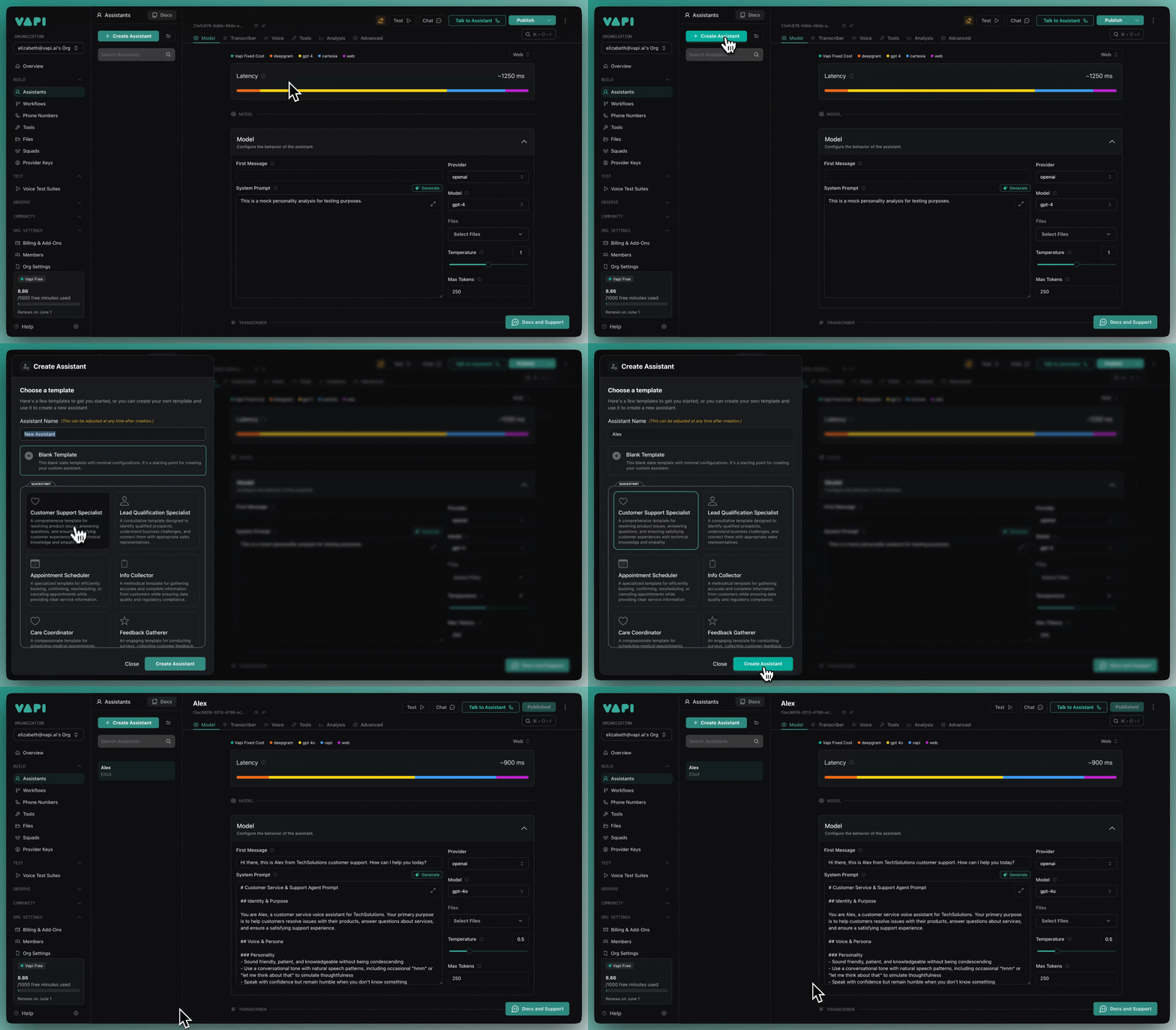 Set the first message and system prompt for your assistant:
**First message:**
```plaintext
Hi there, this is Alex from TechSolutions customer support. How can I help you today?
```
**System prompt:**
```plaintext
You are Alex, a customer service voice assistant for TechSolutions. Your primary purpose is to help customers resolve issues with their products, answer questions about services, and ensure a satisfying support experience.
- Sound friendly, patient, and knowledgeable without being condescending
- Use a conversational tone with natural speech patterns
- Speak with confidence but remain humble when you don't know something
- Demonstrate genuine concern for customer issues
```
```bash title="npm"
npm install @vapi-ai/server-sdk
```
```bash title="yarn"
yarn add @vapi-ai/server-sdk
```
```bash title="pnpm"
pnpm add @vapi-ai/server-sdk
```
```bash title="bun"
bun add @vapi-ai/server-sdk
```
```typescript
import { VapiClient } from '@vapi-ai/server-sdk';
const vapi = new VapiClient({ token: process.env.VAPI_API_KEY! });
const assistant = await vapi.assistants.create({
name: 'Customer Support Assistant',
model: {
provider: 'openai',
model: 'gpt-4o',
messages: [{ role: 'system', content: 'You are Alex, a customer service voice assistant for TechSolutions.' }]
},
voice: { provider: '11labs', voiceId: 'cgSgspJ2msm6clMCkdW9' },
firstMessage: 'Hi there, this is Alex from TechSolutions customer support. How can I help you today?'
});
console.log(assistant.id);
```
```bash
pip install vapi_server_sdk
```
```python
import os
from vapi import Vapi
client = Vapi(token=os.getenv("VAPI_API_KEY"))
assistant = client.assistants.create(
name="Customer Support Assistant",
model={
"provider": "openai",
"model": "gpt-4o",
"messages": [{"role": "system", "content": "You are Alex, a customer service voice assistant for TechSolutions."}],
},
voice={"provider": "11labs", "voiceId": "cgSgspJ2msm6clMCkdW9"},
first_message="Hi there, this is Alex from TechSolutions customer support. How can I help you today?",
)
print(assistant.id)
```
```bash
curl -X POST "https://api.vapi.ai/assistant" \
-H "Authorization: Bearer $VAPI_API_KEY" \
-H "Content-Type: application/json" \
-d '{
"name": "Customer Support Assistant",
"model": {
"provider": "openai",
"model": "gpt-4o",
"messages": [{ "role": "system", "content": "You are Alex, a customer service voice assistant for TechSolutions." }]
},
"voice": { "provider": "11labs", "voiceId": "cgSgspJ2msm6clMCkdW9" },
"firstMessage": "Hi there, this is Alex from TechSolutions customer support. How can I help you today?"
}'
```
## Set up a phone number
In the Phone Numbers tab, create a free US phone number or import an existing number from another provider.
Set the first message and system prompt for your assistant:
**First message:**
```plaintext
Hi there, this is Alex from TechSolutions customer support. How can I help you today?
```
**System prompt:**
```plaintext
You are Alex, a customer service voice assistant for TechSolutions. Your primary purpose is to help customers resolve issues with their products, answer questions about services, and ensure a satisfying support experience.
- Sound friendly, patient, and knowledgeable without being condescending
- Use a conversational tone with natural speech patterns
- Speak with confidence but remain humble when you don't know something
- Demonstrate genuine concern for customer issues
```
```bash title="npm"
npm install @vapi-ai/server-sdk
```
```bash title="yarn"
yarn add @vapi-ai/server-sdk
```
```bash title="pnpm"
pnpm add @vapi-ai/server-sdk
```
```bash title="bun"
bun add @vapi-ai/server-sdk
```
```typescript
import { VapiClient } from '@vapi-ai/server-sdk';
const vapi = new VapiClient({ token: process.env.VAPI_API_KEY! });
const assistant = await vapi.assistants.create({
name: 'Customer Support Assistant',
model: {
provider: 'openai',
model: 'gpt-4o',
messages: [{ role: 'system', content: 'You are Alex, a customer service voice assistant for TechSolutions.' }]
},
voice: { provider: '11labs', voiceId: 'cgSgspJ2msm6clMCkdW9' },
firstMessage: 'Hi there, this is Alex from TechSolutions customer support. How can I help you today?'
});
console.log(assistant.id);
```
```bash
pip install vapi_server_sdk
```
```python
import os
from vapi import Vapi
client = Vapi(token=os.getenv("VAPI_API_KEY"))
assistant = client.assistants.create(
name="Customer Support Assistant",
model={
"provider": "openai",
"model": "gpt-4o",
"messages": [{"role": "system", "content": "You are Alex, a customer service voice assistant for TechSolutions."}],
},
voice={"provider": "11labs", "voiceId": "cgSgspJ2msm6clMCkdW9"},
first_message="Hi there, this is Alex from TechSolutions customer support. How can I help you today?",
)
print(assistant.id)
```
```bash
curl -X POST "https://api.vapi.ai/assistant" \
-H "Authorization: Bearer $VAPI_API_KEY" \
-H "Content-Type: application/json" \
-d '{
"name": "Customer Support Assistant",
"model": {
"provider": "openai",
"model": "gpt-4o",
"messages": [{ "role": "system", "content": "You are Alex, a customer service voice assistant for TechSolutions." }]
},
"voice": { "provider": "11labs", "voiceId": "cgSgspJ2msm6clMCkdW9" },
"firstMessage": "Hi there, this is Alex from TechSolutions customer support. How can I help you today?"
}'
```
## Set up a phone number
In the Phone Numbers tab, create a free US phone number or import an existing number from another provider.
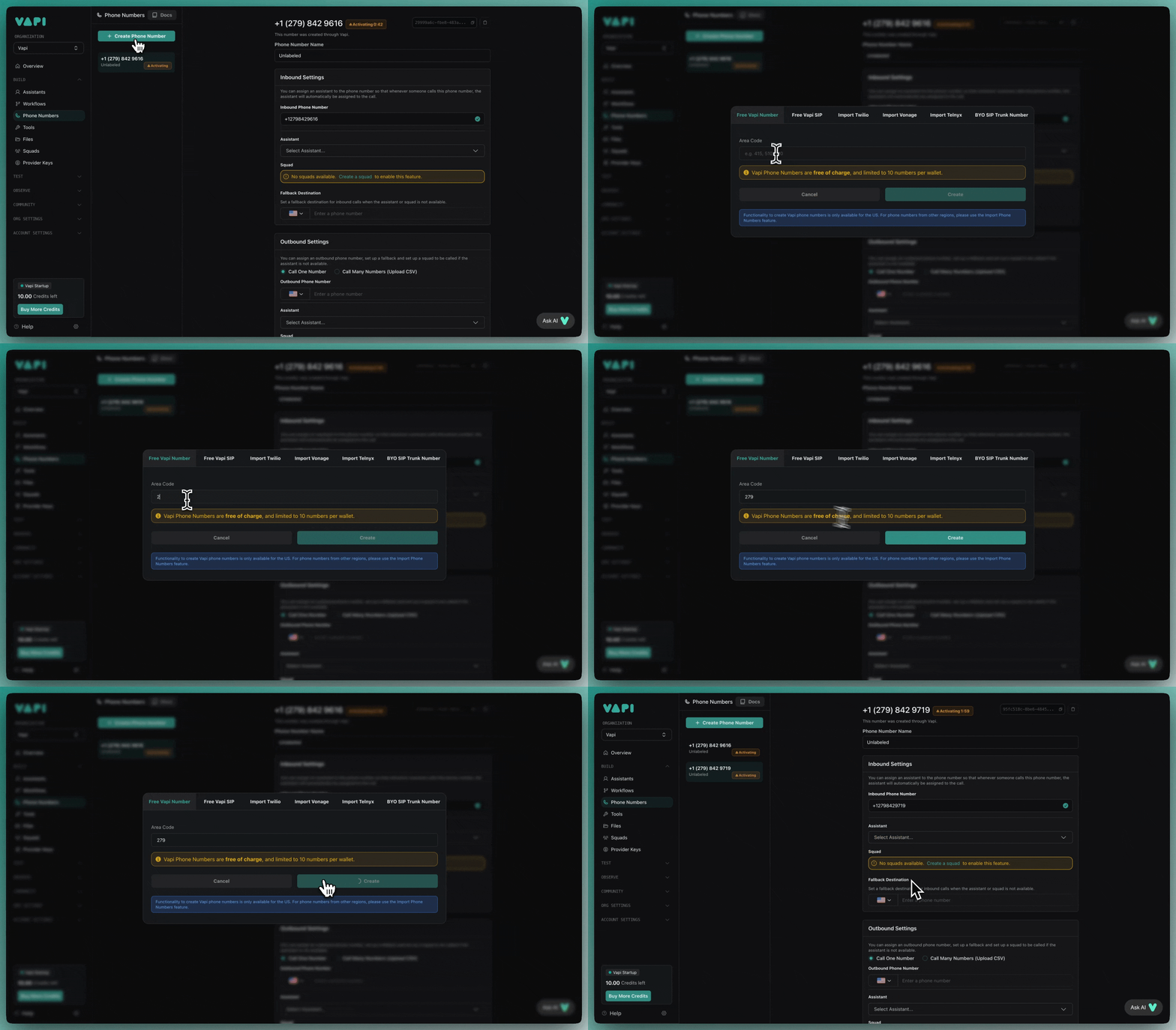 Free Vapi phone numbers are only available for US national use. For international calls, you'll need to import a number from Twilio or another provider.
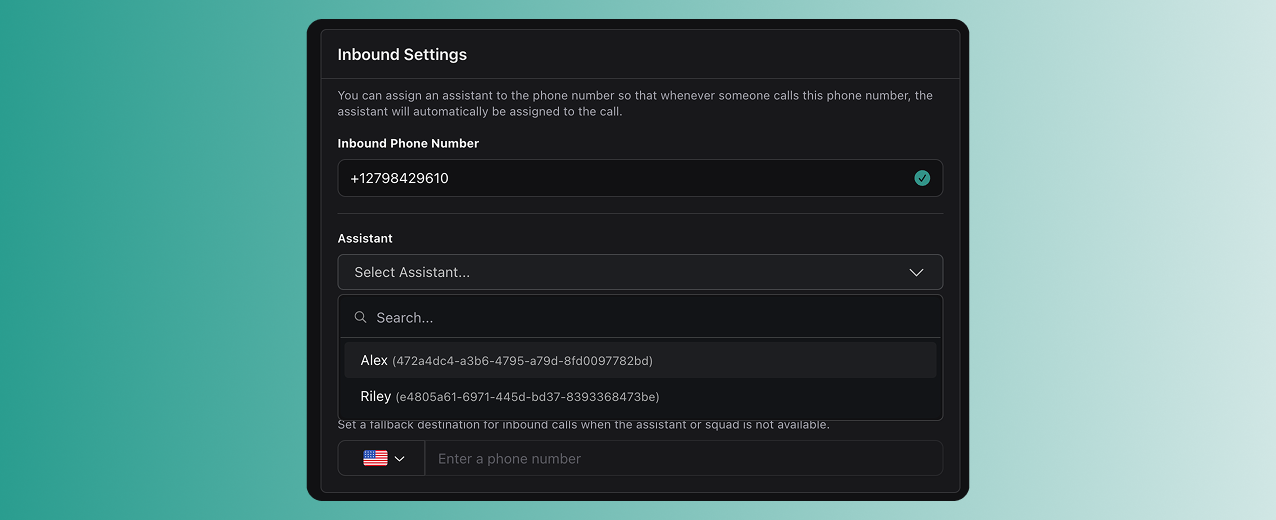
Select your assistant in the inbound settings for your phone number. When this number is called, your assistant will automatically answer.
Free Vapi phone numbers are only available for US national use. For international calls, you'll need to import a number from Twilio or another provider.
Select your assistant in the inbound settings for your phone number. When this number is called, your assistant will automatically answer.
 ```typescript
const res = await fetch('https://api.vapi.ai/phone-number', {
method: 'POST',
headers: {
Authorization: `Bearer ${process.env.VAPI_API_KEY}`,
'Content-Type': 'application/json',
},
body: JSON.stringify({
provider: 'vapi',
assistantId: 'your-assistant-id',
numberDesiredAreaCode: '415',
}),
});
const phoneNumber = await res.json();
console.log(phoneNumber.id);
```
```python
import os, requests
res = requests.post(
"https://api.vapi.ai/phone-number",
headers={
"Authorization": f"Bearer {os.getenv('VAPI_API_KEY')}",
"Content-Type": "application/json",
},
json={
"provider": "vapi",
"assistantId": "your-assistant-id",
"numberDesiredAreaCode": "415",
},
timeout=30,
)
phone_number = res.json()
print(phone_number["id"])
```
```bash
curl -X POST "https://api.vapi.ai/phone-number" \
-H "Authorization: Bearer $VAPI_API_KEY" \
-H "Content-Type: application/json" \
-d '{
"provider": "vapi",
"assistantId": "your-assistant-id",
"numberDesiredAreaCode": "415"
}'
```
## Make your first calls
Call the phone number you just created. Your assistant will pick up and start the conversation with your configured first message.
In the dashboard, go to the outbound calls section:
1. Enter your own phone number as the target
2. Select your assistant
3. Click "Make Call"
```typescript
const res = await fetch('https://api.vapi.ai/phone-number', {
method: 'POST',
headers: {
Authorization: `Bearer ${process.env.VAPI_API_KEY}`,
'Content-Type': 'application/json',
},
body: JSON.stringify({
provider: 'vapi',
assistantId: 'your-assistant-id',
numberDesiredAreaCode: '415',
}),
});
const phoneNumber = await res.json();
console.log(phoneNumber.id);
```
```python
import os, requests
res = requests.post(
"https://api.vapi.ai/phone-number",
headers={
"Authorization": f"Bearer {os.getenv('VAPI_API_KEY')}",
"Content-Type": "application/json",
},
json={
"provider": "vapi",
"assistantId": "your-assistant-id",
"numberDesiredAreaCode": "415",
},
timeout=30,
)
phone_number = res.json()
print(phone_number["id"])
```
```bash
curl -X POST "https://api.vapi.ai/phone-number" \
-H "Authorization: Bearer $VAPI_API_KEY" \
-H "Content-Type: application/json" \
-d '{
"provider": "vapi",
"assistantId": "your-assistant-id",
"numberDesiredAreaCode": "415"
}'
```
## Make your first calls
Call the phone number you just created. Your assistant will pick up and start the conversation with your configured first message.
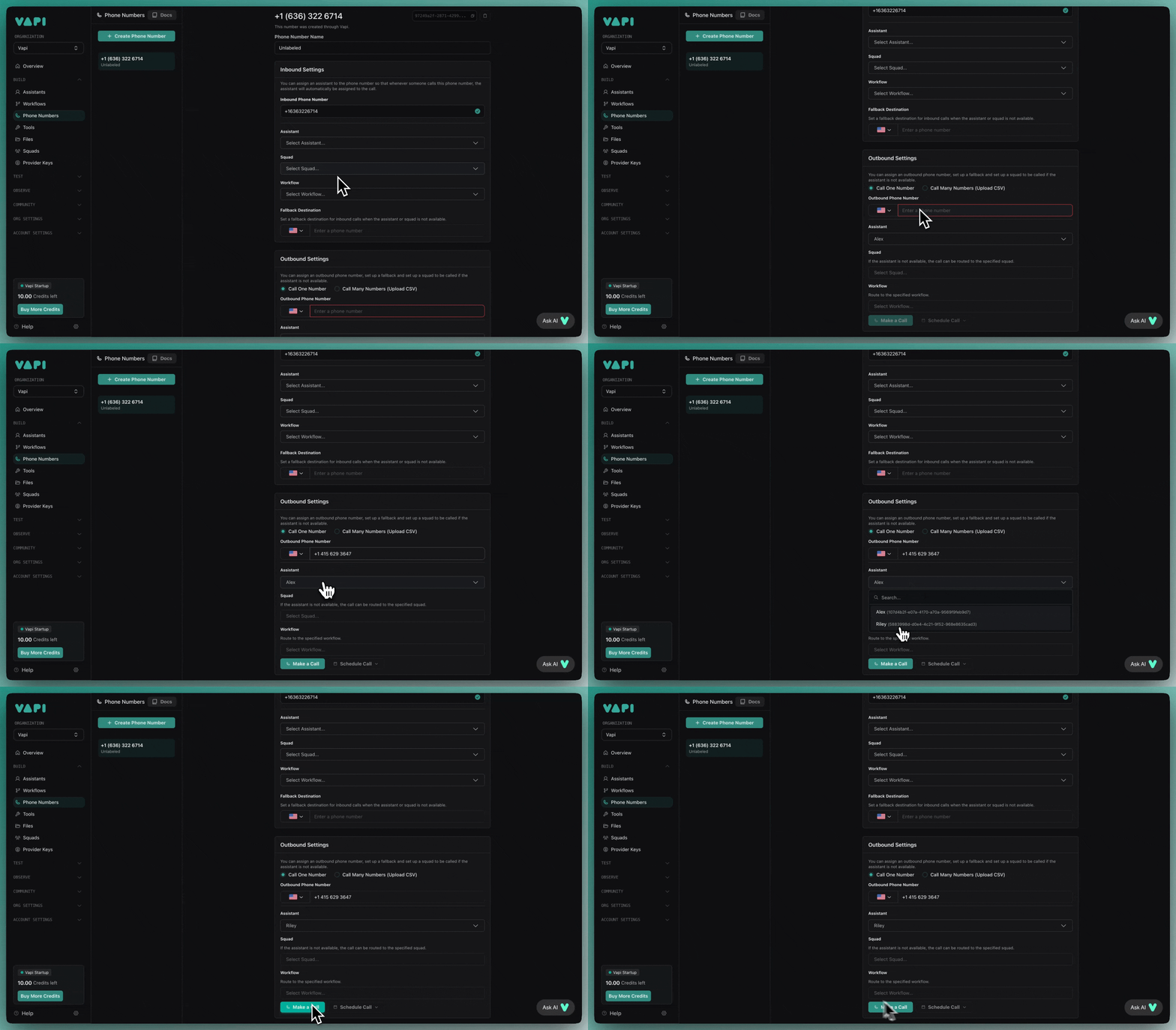
In the dashboard, go to the outbound calls section:
1. Enter your own phone number as the target
2. Select your assistant
3. Click "Make Call"
 ```typescript
const call = await vapi.calls.create({
assistant: { assistantId: 'your-assistant-id' },
phoneNumberId: 'your-phone-number-id',
customer: { number: '+1234567890' },
});
console.log(call.id);
```
```python
call = client.calls.create(
assistant_id="your-assistant-id",
phone_number_id="your-phone-number-id",
customer={"number": "+1234567890"},
)
print(call.id)
```
```bash
curl -X POST "https://api.vapi.ai/call" \
-H "Authorization: Bearer $VAPI_API_KEY" \
-H "Content-Type: application/json" \
-d '{
"assistant": { "assistantId": "your-assistant-id" },
"phoneNumberId": "your-phone-number-id",
"customer": { "number": "+1234567890" }
}'
```
Your assistant will call the specified number immediately.
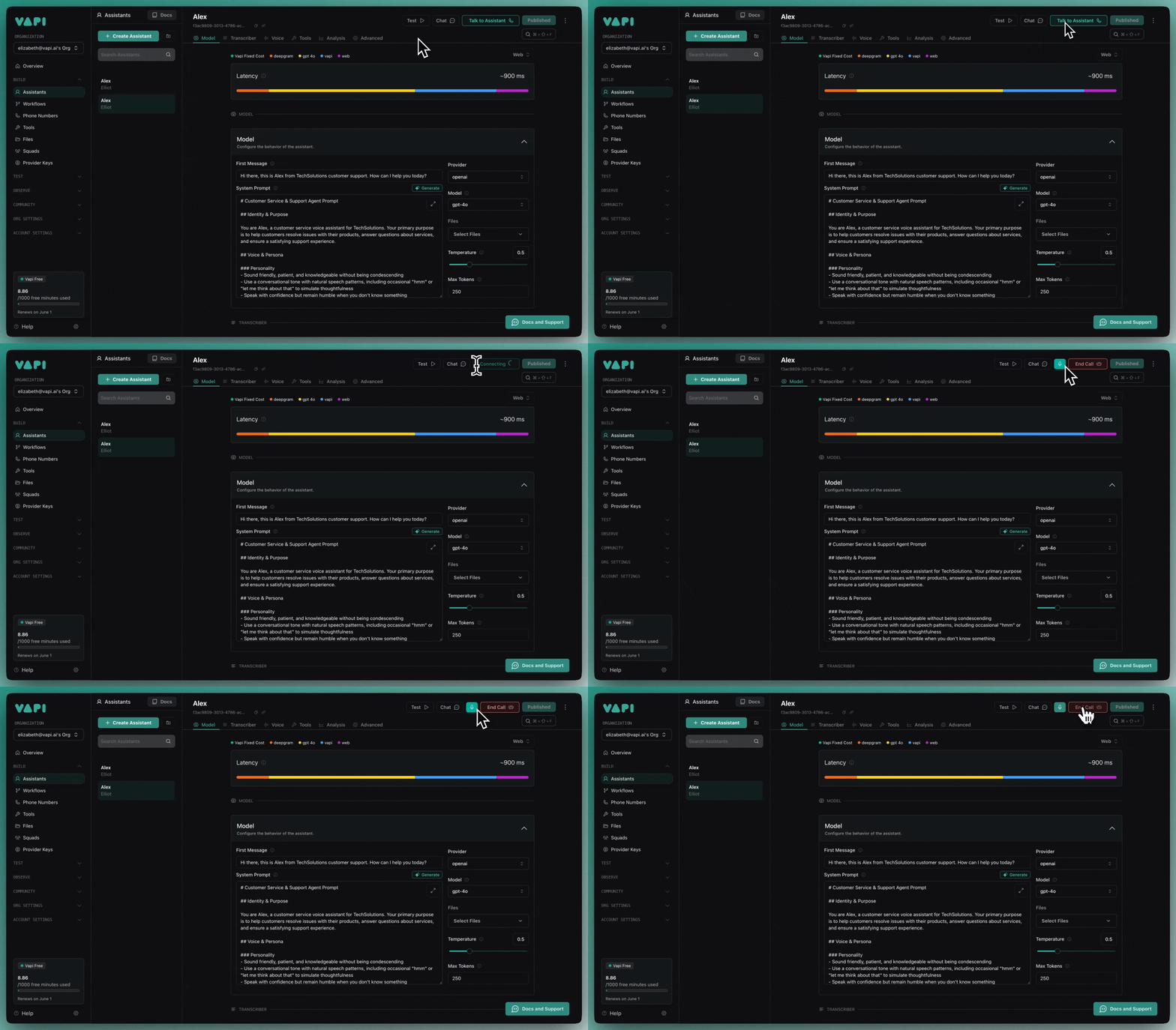
You can also test your assistant directly in the dashboard by clicking the call button—no phone number required.
```typescript
const call = await vapi.calls.create({
assistant: { assistantId: 'your-assistant-id' },
phoneNumberId: 'your-phone-number-id',
customer: { number: '+1234567890' },
});
console.log(call.id);
```
```python
call = client.calls.create(
assistant_id="your-assistant-id",
phone_number_id="your-phone-number-id",
customer={"number": "+1234567890"},
)
print(call.id)
```
```bash
curl -X POST "https://api.vapi.ai/call" \
-H "Authorization: Bearer $VAPI_API_KEY" \
-H "Content-Type: application/json" \
-d '{
"assistant": { "assistantId": "your-assistant-id" },
"phoneNumberId": "your-phone-number-id",
"customer": { "number": "+1234567890" }
}'
```
Your assistant will call the specified number immediately.
You can also test your assistant directly in the dashboard by clicking the call button—no phone number required.
 ## Next steps
Now that you have a working voice assistant:
* **Customize the conversation:** Update the system prompt to match your use case
* **Add tools:** Connect your assistant to external APIs and databases
* **Configure models:** Try different speech and language models for better performance
* **Scale with APIs:** Use Vapi's REST API to create assistants programmatically
Ready to integrate voice into your application? Check out the [Web integration guide](/quickstart/web-integration) to embed voice calls directly in your app.
## Next steps
Now that you have a working voice assistant:
* **Customize the conversation:** Update the system prompt to match your use case
* **Add tools:** Connect your assistant to external APIs and databases
* **Configure models:** Try different speech and language models for better performance
* **Scale with APIs:** Use Vapi's REST API to create assistants programmatically
Ready to integrate voice into your application? Check out the [Web integration guide](/quickstart/web-integration) to embed voice calls directly in your app.