> For clean Markdown of any page, append .md to the page URL.
> For a complete documentation index, see https://docs.vapi.ai/llms.txt.
> For full documentation content, see https://docs.vapi.ai/llms-full.txt.
> For AI client integration (Claude Code, Cursor, etc.), connect to the MCP server at https://docs.vapi.ai/_mcp/server.
# Setting server URLs
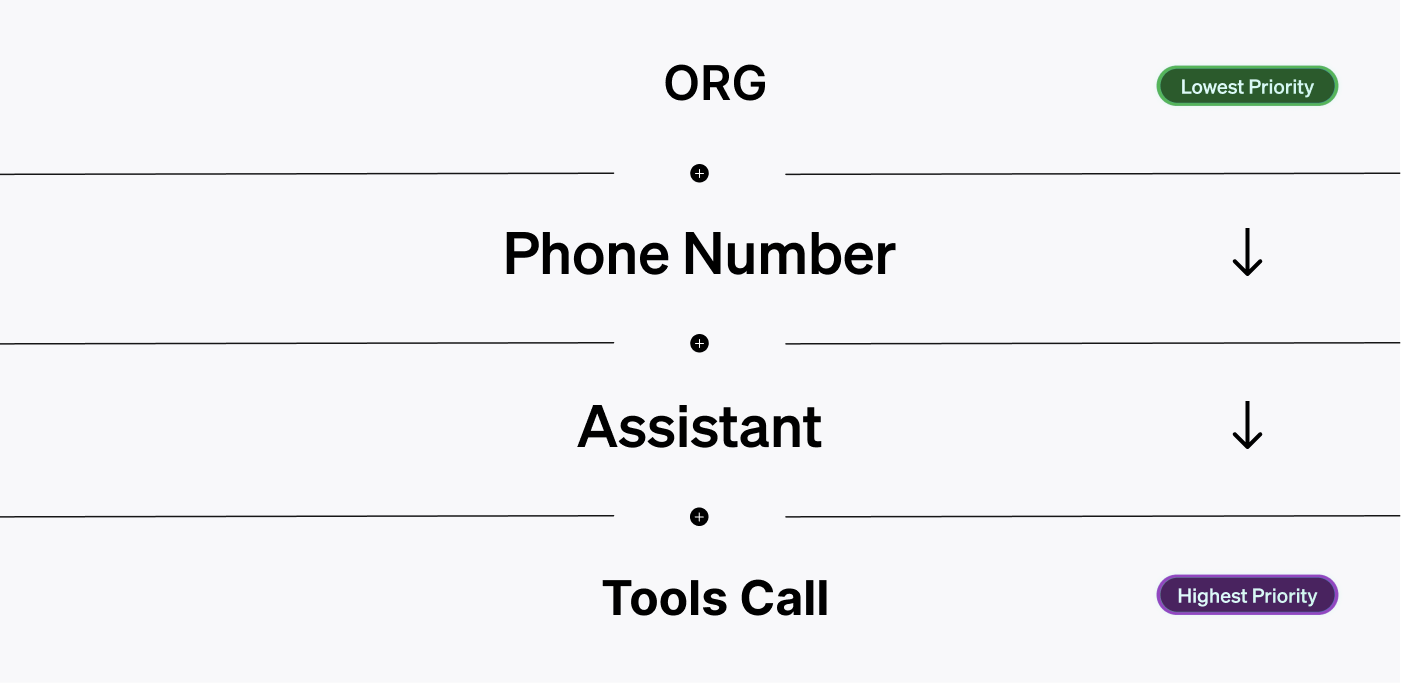 Server URLs can be set in multiple places in Vapi. Each level has a different priority.
The server URL with the highest priority for a relevant event will be the one that Vapi uses to send the event to.
Server URLs can be set at **4 levels** in Vapi:
* **Account-wide:** you can set a server URL for your broader account
* **Phone Number:** server URLs can be attached to phone numbers themselves
* **Assistant:** assistants can be configured with a server URL
* **Function:** function calls themselves (under an assistant) can have a corresponding server URL
## Setting Server URLs
Here's a breakdown of where you can set server URLs in Vapi:
You can set an organization-wide server URL in the [organization section](https://dashboard.vapi.ai/vapi-api) of your dashboard.
Server URLs can be set in multiple places in Vapi. Each level has a different priority.
The server URL with the highest priority for a relevant event will be the one that Vapi uses to send the event to.
Server URLs can be set at **4 levels** in Vapi:
* **Account-wide:** you can set a server URL for your broader account
* **Phone Number:** server URLs can be attached to phone numbers themselves
* **Assistant:** assistants can be configured with a server URL
* **Function:** function calls themselves (under an assistant) can have a corresponding server URL
## Setting Server URLs
Here's a breakdown of where you can set server URLs in Vapi:
You can set an organization-wide server URL in the [organization section](https://dashboard.vapi.ai/vapi-api) of your dashboard.
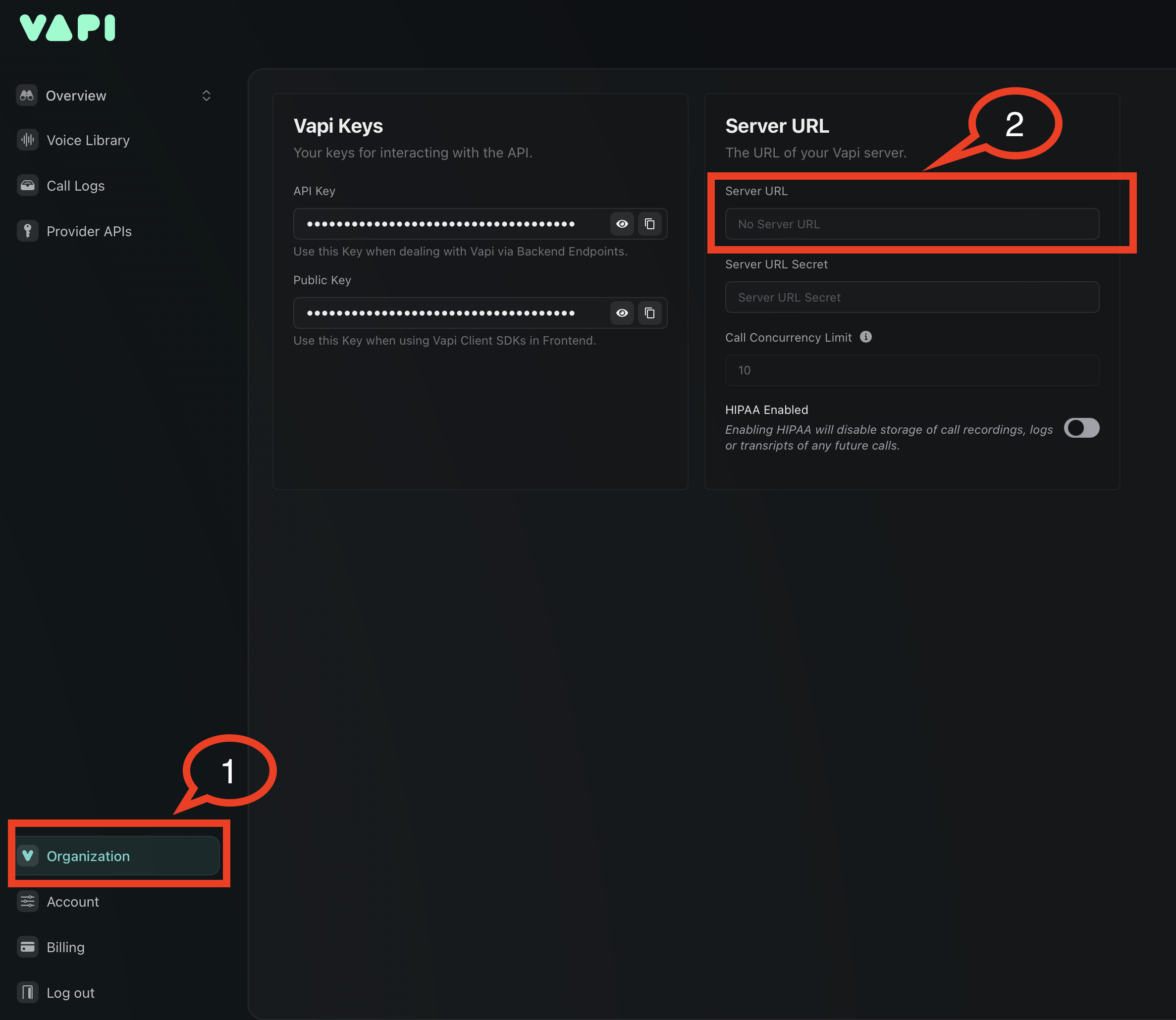 If no other server URL is set, Vapi will use this one.
Phone numbers can have a server URL attached to them via the [phone number API](/api-reference/phone-numbers).
The server URL for phone numbers can be set **3 ways**:
* **At Time of Creation:** when you [create a free number](/api-reference/phone-numbers/create) through Vapi
* **At Import:** when you [import from Twilio](/api-reference/phone-numbers/import-twilio-number) or [Vonage](/api-reference/phone-numbers/import-vonage-number)
* **Via Update:** you can [update a number](/api-reference/phone-numbers/update-phone-number) already in your account
The phone number's server configuration includes both the URL and optional authentication:
* `phoneNumber.server.url`: The webhook endpoint URL
* `phoneNumber.server.credentialId`: Authentication credential ID (optional)
For secured webhooks, create [Custom Credentials](./server-authentication) and reference them using `credentialId`.
Assistants themselves can have a server URL attached to them.
There are **2 ways** this can be done:
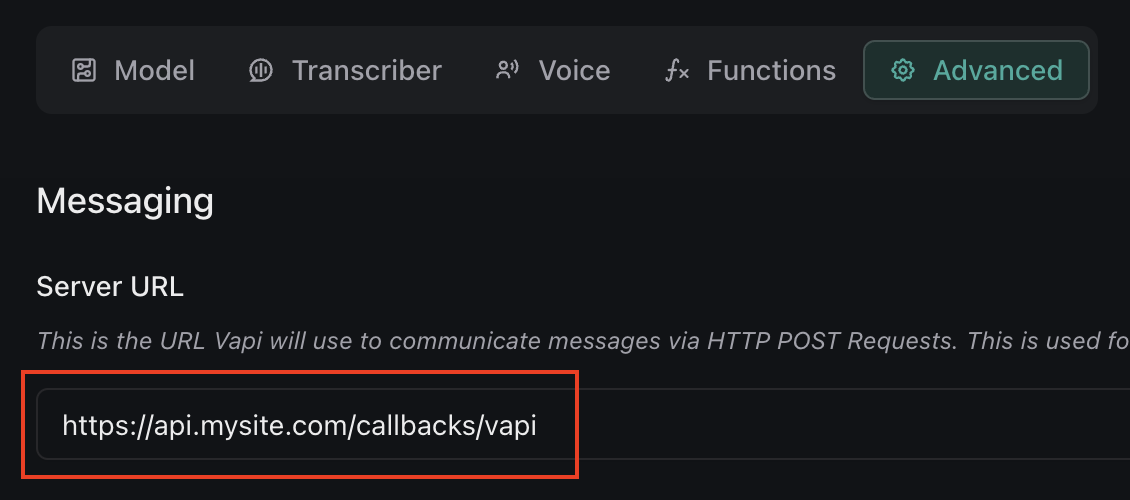
If you go to the [assistant section](https://dashboard.vapi.ai/assistants) of your dashboard, in the **"Advanced"** tab you will see a setting to set the assistant's server URL:
If no other server URL is set, Vapi will use this one.
Phone numbers can have a server URL attached to them via the [phone number API](/api-reference/phone-numbers).
The server URL for phone numbers can be set **3 ways**:
* **At Time of Creation:** when you [create a free number](/api-reference/phone-numbers/create) through Vapi
* **At Import:** when you [import from Twilio](/api-reference/phone-numbers/import-twilio-number) or [Vonage](/api-reference/phone-numbers/import-vonage-number)
* **Via Update:** you can [update a number](/api-reference/phone-numbers/update-phone-number) already in your account
The phone number's server configuration includes both the URL and optional authentication:
* `phoneNumber.server.url`: The webhook endpoint URL
* `phoneNumber.server.credentialId`: Authentication credential ID (optional)
For secured webhooks, create [Custom Credentials](./server-authentication) and reference them using `credentialId`.
Assistants themselves can have a server URL attached to them.
There are **2 ways** this can be done:
If you go to the [assistant section](https://dashboard.vapi.ai/assistants) of your dashboard, in the **"Advanced"** tab you will see a setting to set the assistant's server URL:
 At [assistant creation](/api-reference/assistants/create-assistant) (or via an [update](/api-reference/assistants/update-assistant)) you can set the assistant's server configuration.
The assistant's server configuration includes:
* `assistant.server.url`: The webhook endpoint URL
* `assistant.server.credentialId`: Authentication credential ID (optional)
For secured webhooks, use [Custom Credentials](./server-authentication) with `credentialId` instead of inline authentication.
The most granular level server URLs can be set is at the function call level. This can also be done either in the dashboard, or via code.
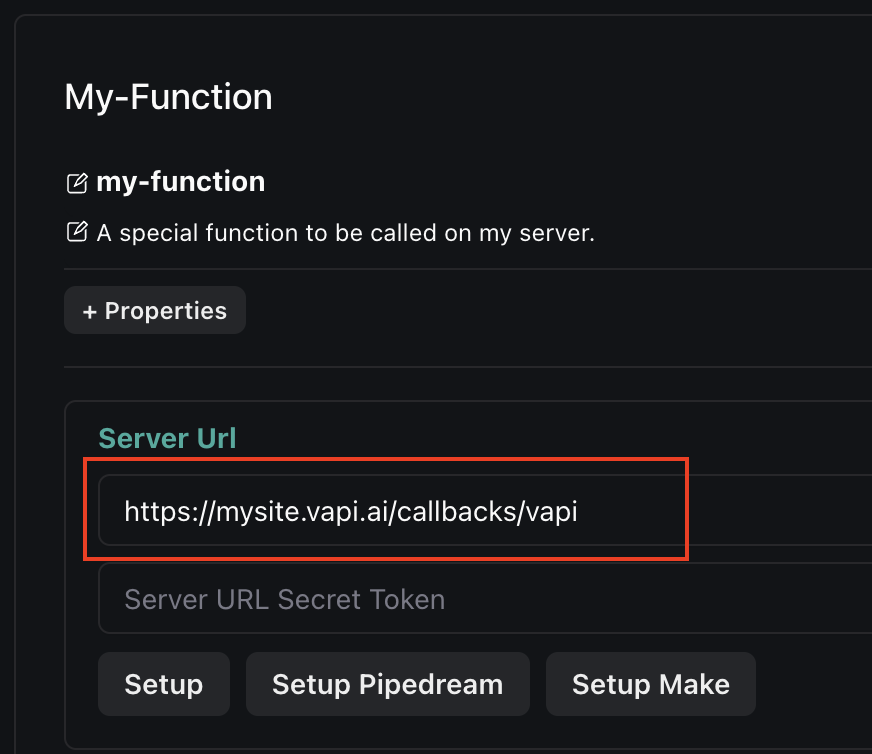
In the [assistant section](https://dashboard.vapi.ai/assistants) of your dashboard, in the **"Functions"** tab you can add function calls & optionally give each a specific server URL:
At [assistant creation](/api-reference/assistants/create-assistant) (or via an [update](/api-reference/assistants/update-assistant)) you can set the assistant's server configuration.
The assistant's server configuration includes:
* `assistant.server.url`: The webhook endpoint URL
* `assistant.server.credentialId`: Authentication credential ID (optional)
For secured webhooks, use [Custom Credentials](./server-authentication) with `credentialId` instead of inline authentication.
The most granular level server URLs can be set is at the function call level. This can also be done either in the dashboard, or via code.
In the [assistant section](https://dashboard.vapi.ai/assistants) of your dashboard, in the **"Functions"** tab you can add function calls & optionally give each a specific server URL:
 Function tools can be configured with server endpoints via the [tools API](/api-reference/tools) or within assistant configurations.
The server configuration for function tools includes:
* `tool.server.url`: The function endpoint URL
* `tool.server.credentialId`: Authentication credential ID (optional)
You can configure function tool servers at [tool creation](/api-reference/tools/create), [assistant creation](/api-reference/assistants/create-assistant), or in updates.
Use [Custom Credentials](./server-authentication) to secure your function endpoints with `credentialId`.
## URL Priority
Events are only sent/assigned to 1 server URL in the priority stack. Here's the order of priority:
1. **Function:** if a function call has a server URL, the function call event will be sent to that URL
2. **Assistant:** assistant server URLs are the next highest priority
3. **Phone Number:** if a phone number has a server URL, it will be used over the account-wide URL
4. **Account-wide:** Default / "lowest" importance. It will be used if no other server URL is set.
You will most commonly set a server URL on your account, and/or on specific assistants.
Function tools can be configured with server endpoints via the [tools API](/api-reference/tools) or within assistant configurations.
The server configuration for function tools includes:
* `tool.server.url`: The function endpoint URL
* `tool.server.credentialId`: Authentication credential ID (optional)
You can configure function tool servers at [tool creation](/api-reference/tools/create), [assistant creation](/api-reference/assistants/create-assistant), or in updates.
Use [Custom Credentials](./server-authentication) to secure your function endpoints with `credentialId`.
## URL Priority
Events are only sent/assigned to 1 server URL in the priority stack. Here's the order of priority:
1. **Function:** if a function call has a server URL, the function call event will be sent to that URL
2. **Assistant:** assistant server URLs are the next highest priority
3. **Phone Number:** if a phone number has a server URL, it will be used over the account-wide URL
4. **Account-wide:** Default / "lowest" importance. It will be used if no other server URL is set.
You will most commonly set a server URL on your account, and/or on specific assistants.