> For clean Markdown of any page, append .md to the page URL.
> For a complete documentation index, see https://docs.vapi.ai/llms.txt.
> For full documentation content, see https://docs.vapi.ai/llms-full.txt.
> For AI client integration (Claude Code, Cursor, etc.), connect to the MCP server at https://docs.vapi.ai/_mcp/server.
# Appointment scheduling workflow
> Build a voice AI appointment scheduling workflow with calendar integration, availability checking, and automated confirmations using Vapi's workflow builder.
This example uses Workflows. For new builds, use **Assistants** or **Squads**. See the updated guides: [Assistant - Appointment Scheduling](/assistants/examples/appointment-scheduling) or [Squads](/squads).
## Overview
Build an AI-powered appointment scheduling workflow that handles inbound calls for booking, rescheduling, and canceling appointments. The workflow uses visual nodes to create branching logic, integrates with calendar systems, checks availability in real-time, and sends confirmation messages.
**What You'll Build:**
* Visual workflow with branching appointment logic
* Real-time calendar integration and availability checking
* Customer database with automated confirmations
* Global nodes for error handling and validation
* 24/7 phone booking with conditional routing
## Prerequisites
* A [Vapi account](https://dashboard.vapi.ai/).
* A Google Calendar account (or other calendar service).
## Scenario
We will be creating an appointment scheduling workflow for Tony's Barbershop, a traditional barbershop that wants to automate their phone booking process with sophisticated branching logic to handle different appointment scenarios.
## Final Workflow
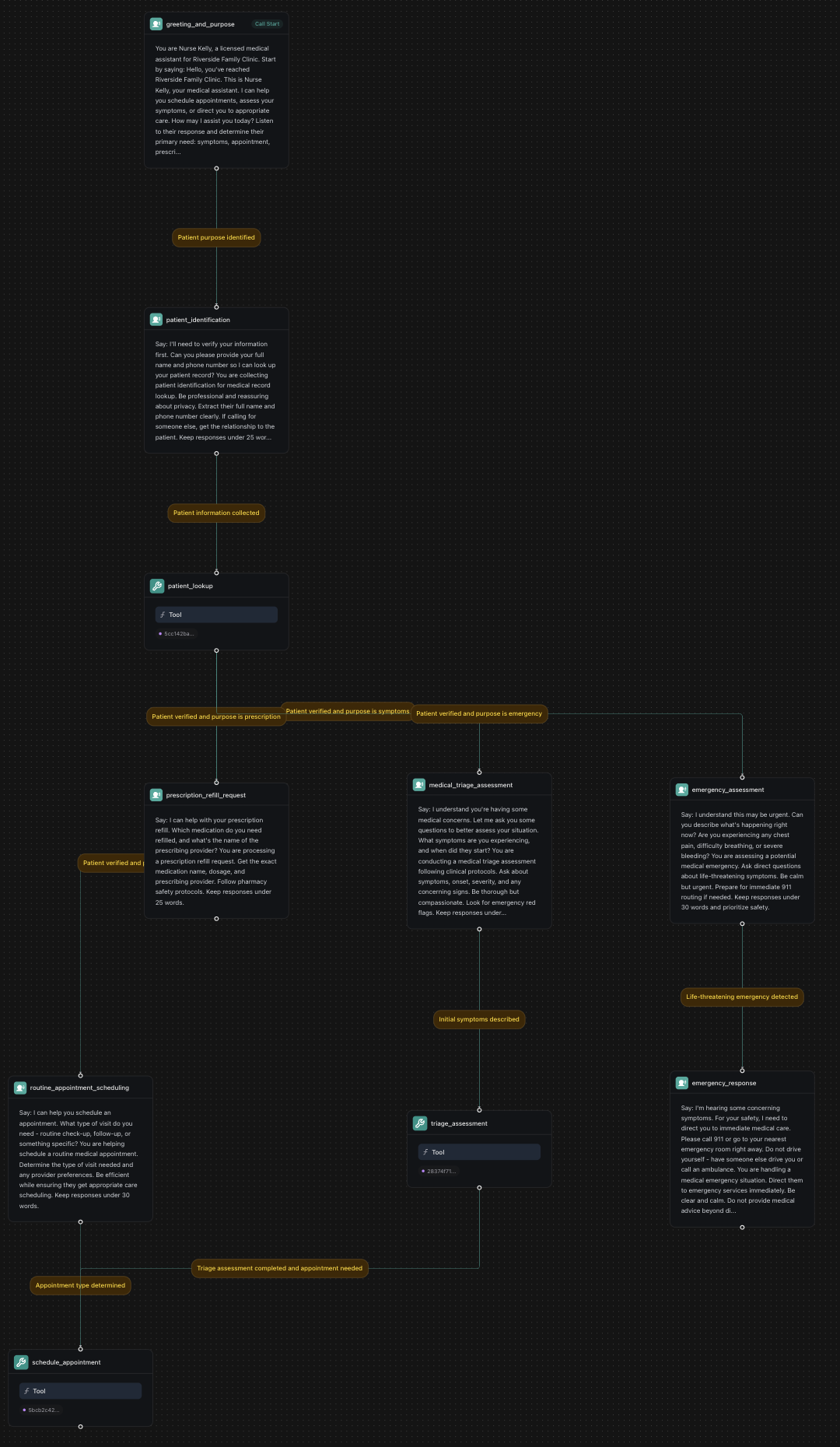 ***
## 1. Create a Knowledge Base
Download services.csv
Download customers.csv
Download appointments.csv
In your Vapi dashboard, click `Files` in the left sidebar.
* Click `Choose file`. Upload all three CSV files: `services.csv`, `customers.csv`, and `appointments.csv`.
* Note the file IDs. We'll need them later to create tools.
```typescript
import { VapiClient } from "@vapi-ai/server-sdk";
import fs from 'fs';
const vapi = new VapiClient({ token: "YOUR_VAPI_API_KEY" });
async function uploadAppointmentFiles() {
try {
// Upload services file
const servicesFile = await vapi.files.create({
file: fs.createReadStream("services.csv")
});
// Upload customers file
const customersFile = await vapi.files.create({
file: fs.createReadStream("customers.csv")
});
// Upload appointments file
const appointmentsFile = await vapi.files.create({
file: fs.createReadStream("appointments.csv")
});
console.log(`Services file ID: ${servicesFile.id}`);
console.log(`Customers file ID: ${customersFile.id}`);
console.log(`Appointments file ID: ${appointmentsFile.id}`);
return {
servicesFileId: servicesFile.id,
customersFileId: customersFile.id,
appointmentsFileId: appointmentsFile.id
};
} catch (error) {
console.error('Error uploading files:', error);
throw error;
}
}
// Upload all files for appointment workflow
const fileIds = await uploadAppointmentFiles();
```
```python
import requests
def upload_appointment_file(file_path):
"""Upload a CSV file for appointment workflow data"""
url = "https://api.vapi.ai/file"
headers = {"Authorization": f"Bearer {YOUR_VAPI_API_KEY}"}
try:
with open(file_path, 'rb') as file:
files = {'file': file}
response = requests.post(url, headers=headers, files=files)
response.raise_for_status()
return response.json()
except requests.exceptions.RequestException as error:
print(f"Error uploading {file_path}: {error}")
raise
# Upload all required files for appointment workflow
services_file = upload_appointment_file("services.csv")
customers_file = upload_appointment_file("customers.csv")
appointments_file = upload_appointment_file("appointments.csv")
print(f"Services file ID: {services_file['id']}")
print(f"Customers file ID: {customers_file['id']}")
print(f"Appointments file ID: {appointments_file['id']}")
```
```bash
# Upload services.csv
curl -X POST https://api.vapi.ai/file \
-H "Authorization: Bearer YOUR_VAPI_API_KEY" \
-F "file=@services.csv"
# Upload customers.csv
curl -X POST https://api.vapi.ai/file \
-H "Authorization: Bearer YOUR_VAPI_API_KEY" \
-F "file=@customers.csv"
# Upload appointments.csv
curl -X POST https://api.vapi.ai/file \
-H "Authorization: Bearer YOUR_VAPI_API_KEY" \
-F "file=@appointments.csv"
```
***
## 2. Create a Workflow
Go to [dashboard.vapi.ai](https://dashboard.vapi.ai) and log in to your account.
Click `Workflows` in the left sidebar.
* Click `Create Workflow`.
* Enter workflow name: `Barbershop Appointment Workflow`.
* Select the default template (includes Call Start node).
* Click "Create Workflow".
- Configure workflow variables for customer data and appointment information
```typescript
import { VapiClient } from "@vapi-ai/server-sdk";
const vapi = new VapiClient({ token: "YOUR_VAPI_API_KEY" });
async function createAppointmentWorkflow() {
try {
// Create workflow with initial greeting node
const workflow = await vapi.workflows.create({
name: "Barbershop Appointment Workflow",
nodes: [
{
id: "greeting",
type: "conversation",
firstMessage: "Hello! Thank you for calling Tony's Barbershop. This is Sarah, your booking assistant. I can help you schedule, reschedule, or cancel appointments. How can I help you today?",
systemPrompt: "You are Sarah, the friendly booking assistant for Tony's Barbershop. Listen to the customer's response and determine their intent: schedule, reschedule, cancel, status, or other. Keep responses under 35 words.",
extractVariables: [
{
name: "intent",
type: "string",
description: "The customer's primary intent",
enum: ["schedule", "reschedule", "cancel", "status", "other"]
}
]
}
],
edges: []
});
console.log(`Workflow created with ID: ${workflow.id}`);
return workflow;
} catch (error) {
console.error('Error creating workflow:', error);
throw error;
}
}
// Create the appointment workflow
const workflow = await createAppointmentWorkflow();
```
```python
import requests
def create_appointment_workflow():
"""Create a new appointment scheduling workflow"""
url = "https://api.vapi.ai/workflow"
headers = {
"Authorization": f"Bearer {YOUR_VAPI_API_KEY}",
"Content-Type": "application/json"
}
data = {
"name": "Barbershop Appointment Workflow",
"nodes": [
{
"id": "greeting",
"type": "conversation",
"firstMessage": "Hello! Thank you for calling Tony's Barbershop. This is Sarah, your booking assistant. I can help you schedule, reschedule, or cancel appointments. How can I help you today?",
"systemPrompt": "You are Sarah, the friendly booking assistant for Tony's Barbershop. Listen to the customer's response and determine their intent: schedule, reschedule, cancel, status, or other. Keep responses under 35 words.",
"extractVariables": [
{
"name": "intent",
"type": "string",
"description": "The customer's primary intent",
"enum": ["schedule", "reschedule", "cancel", "status", "other"]
}
]
}
],
"edges": []
}
try:
response = requests.post(url, headers=headers, json=data)
response.raise_for_status()
return response.json()
except requests.exceptions.RequestException as error:
print(f"Error creating workflow: {error}")
raise
# Create the appointment workflow
workflow = create_appointment_workflow()
print(f"Workflow created with ID: {workflow['id']}")
```
```bash
curl -X POST https://api.vapi.ai/workflow \
-H "Authorization: Bearer YOUR_VAPI_API_KEY" \
-H "Content-Type: application/json" \
-d '{
"name": "Barbershop Appointment Workflow",
"nodes": [
{
"id": "greeting",
"type": "conversation",
"firstMessage": "Hello! Thank you for calling Tony'\''s Barbershop. This is Sarah, your booking assistant. I can help you schedule, reschedule, or cancel appointments. How can I help you today?",
"systemPrompt": "You are Sarah, the friendly booking assistant for Tony'\''s Barbershop. Listen to the customer'\''s response and determine their intent: schedule, reschedule, cancel, status, or other. Keep responses under 35 words.",
"extractVariables": [
{
"name": "intent",
"type": "string",
"description": "The customer'\''s primary intent",
"enum": ["schedule", "reschedule", "cancel", "status", "other"]
}
]
}
],
"edges": []
}'
```
***
## 3. Build the Workflow
You'll start with a default template that includes a "Call Start" node. We'll modify the existing nodes and add new ones to create our appointment scheduling workflow.
The default template includes a conversation node. Click on it and configure:
```txt title="First Message"
Hello! Thank you for calling Tony's Barbershop. This is Sarah, your booking assistant. I can help you schedule, reschedule, or cancel appointments. How can I help you today?
```
```txt title="Prompt"
You are Sarah, the friendly booking assistant for Tony's Barbershop.
Listen to the customer's response and determine their intent:
- "schedule" for new appointments
- "reschedule" for changing existing appointments
- "cancel" for canceling appointments
- "status" for checking appointment details
- "other" for anything else
Keep responses under 35 words. Ask clarifying questions if intent is unclear.
```
**Extract Variables**:
* Variable: `intent`
* Type: `String`
* Description: `The customer's primary intent`
* Enum Values: `schedule`, `reschedule`, `cancel`, `status`, `other`
Click the + button below the greeting node and add a new **Conversation** node:
```txt title="Condition"
Intent identified
```
```txt title="First Message"
Now I need to verify your information. Can you please provide your phone number or full name so I can look up your account?
```
```txt title="Prompt"
You are collecting customer identification information to look them up in the system.
If they provide a phone number, extract it in a clean format (numbers only).
If they provide a name, extract their full name.
Be friendly and reassuring about privacy. Keep responses under 25 words.
```
**Extract Variables**:
* Variable: `phone_number`
* Type: `String`
* Description: `Customer's phone number if provided`
***
## 1. Create a Knowledge Base
Download services.csv
Download customers.csv
Download appointments.csv
In your Vapi dashboard, click `Files` in the left sidebar.
* Click `Choose file`. Upload all three CSV files: `services.csv`, `customers.csv`, and `appointments.csv`.
* Note the file IDs. We'll need them later to create tools.
```typescript
import { VapiClient } from "@vapi-ai/server-sdk";
import fs from 'fs';
const vapi = new VapiClient({ token: "YOUR_VAPI_API_KEY" });
async function uploadAppointmentFiles() {
try {
// Upload services file
const servicesFile = await vapi.files.create({
file: fs.createReadStream("services.csv")
});
// Upload customers file
const customersFile = await vapi.files.create({
file: fs.createReadStream("customers.csv")
});
// Upload appointments file
const appointmentsFile = await vapi.files.create({
file: fs.createReadStream("appointments.csv")
});
console.log(`Services file ID: ${servicesFile.id}`);
console.log(`Customers file ID: ${customersFile.id}`);
console.log(`Appointments file ID: ${appointmentsFile.id}`);
return {
servicesFileId: servicesFile.id,
customersFileId: customersFile.id,
appointmentsFileId: appointmentsFile.id
};
} catch (error) {
console.error('Error uploading files:', error);
throw error;
}
}
// Upload all files for appointment workflow
const fileIds = await uploadAppointmentFiles();
```
```python
import requests
def upload_appointment_file(file_path):
"""Upload a CSV file for appointment workflow data"""
url = "https://api.vapi.ai/file"
headers = {"Authorization": f"Bearer {YOUR_VAPI_API_KEY}"}
try:
with open(file_path, 'rb') as file:
files = {'file': file}
response = requests.post(url, headers=headers, files=files)
response.raise_for_status()
return response.json()
except requests.exceptions.RequestException as error:
print(f"Error uploading {file_path}: {error}")
raise
# Upload all required files for appointment workflow
services_file = upload_appointment_file("services.csv")
customers_file = upload_appointment_file("customers.csv")
appointments_file = upload_appointment_file("appointments.csv")
print(f"Services file ID: {services_file['id']}")
print(f"Customers file ID: {customers_file['id']}")
print(f"Appointments file ID: {appointments_file['id']}")
```
```bash
# Upload services.csv
curl -X POST https://api.vapi.ai/file \
-H "Authorization: Bearer YOUR_VAPI_API_KEY" \
-F "file=@services.csv"
# Upload customers.csv
curl -X POST https://api.vapi.ai/file \
-H "Authorization: Bearer YOUR_VAPI_API_KEY" \
-F "file=@customers.csv"
# Upload appointments.csv
curl -X POST https://api.vapi.ai/file \
-H "Authorization: Bearer YOUR_VAPI_API_KEY" \
-F "file=@appointments.csv"
```
***
## 2. Create a Workflow
Go to [dashboard.vapi.ai](https://dashboard.vapi.ai) and log in to your account.
Click `Workflows` in the left sidebar.
* Click `Create Workflow`.
* Enter workflow name: `Barbershop Appointment Workflow`.
* Select the default template (includes Call Start node).
* Click "Create Workflow".
- Configure workflow variables for customer data and appointment information
```typescript
import { VapiClient } from "@vapi-ai/server-sdk";
const vapi = new VapiClient({ token: "YOUR_VAPI_API_KEY" });
async function createAppointmentWorkflow() {
try {
// Create workflow with initial greeting node
const workflow = await vapi.workflows.create({
name: "Barbershop Appointment Workflow",
nodes: [
{
id: "greeting",
type: "conversation",
firstMessage: "Hello! Thank you for calling Tony's Barbershop. This is Sarah, your booking assistant. I can help you schedule, reschedule, or cancel appointments. How can I help you today?",
systemPrompt: "You are Sarah, the friendly booking assistant for Tony's Barbershop. Listen to the customer's response and determine their intent: schedule, reschedule, cancel, status, or other. Keep responses under 35 words.",
extractVariables: [
{
name: "intent",
type: "string",
description: "The customer's primary intent",
enum: ["schedule", "reschedule", "cancel", "status", "other"]
}
]
}
],
edges: []
});
console.log(`Workflow created with ID: ${workflow.id}`);
return workflow;
} catch (error) {
console.error('Error creating workflow:', error);
throw error;
}
}
// Create the appointment workflow
const workflow = await createAppointmentWorkflow();
```
```python
import requests
def create_appointment_workflow():
"""Create a new appointment scheduling workflow"""
url = "https://api.vapi.ai/workflow"
headers = {
"Authorization": f"Bearer {YOUR_VAPI_API_KEY}",
"Content-Type": "application/json"
}
data = {
"name": "Barbershop Appointment Workflow",
"nodes": [
{
"id": "greeting",
"type": "conversation",
"firstMessage": "Hello! Thank you for calling Tony's Barbershop. This is Sarah, your booking assistant. I can help you schedule, reschedule, or cancel appointments. How can I help you today?",
"systemPrompt": "You are Sarah, the friendly booking assistant for Tony's Barbershop. Listen to the customer's response and determine their intent: schedule, reschedule, cancel, status, or other. Keep responses under 35 words.",
"extractVariables": [
{
"name": "intent",
"type": "string",
"description": "The customer's primary intent",
"enum": ["schedule", "reschedule", "cancel", "status", "other"]
}
]
}
],
"edges": []
}
try:
response = requests.post(url, headers=headers, json=data)
response.raise_for_status()
return response.json()
except requests.exceptions.RequestException as error:
print(f"Error creating workflow: {error}")
raise
# Create the appointment workflow
workflow = create_appointment_workflow()
print(f"Workflow created with ID: {workflow['id']}")
```
```bash
curl -X POST https://api.vapi.ai/workflow \
-H "Authorization: Bearer YOUR_VAPI_API_KEY" \
-H "Content-Type: application/json" \
-d '{
"name": "Barbershop Appointment Workflow",
"nodes": [
{
"id": "greeting",
"type": "conversation",
"firstMessage": "Hello! Thank you for calling Tony'\''s Barbershop. This is Sarah, your booking assistant. I can help you schedule, reschedule, or cancel appointments. How can I help you today?",
"systemPrompt": "You are Sarah, the friendly booking assistant for Tony'\''s Barbershop. Listen to the customer'\''s response and determine their intent: schedule, reschedule, cancel, status, or other. Keep responses under 35 words.",
"extractVariables": [
{
"name": "intent",
"type": "string",
"description": "The customer'\''s primary intent",
"enum": ["schedule", "reschedule", "cancel", "status", "other"]
}
]
}
],
"edges": []
}'
```
***
## 3. Build the Workflow
You'll start with a default template that includes a "Call Start" node. We'll modify the existing nodes and add new ones to create our appointment scheduling workflow.
The default template includes a conversation node. Click on it and configure:
```txt title="First Message"
Hello! Thank you for calling Tony's Barbershop. This is Sarah, your booking assistant. I can help you schedule, reschedule, or cancel appointments. How can I help you today?
```
```txt title="Prompt"
You are Sarah, the friendly booking assistant for Tony's Barbershop.
Listen to the customer's response and determine their intent:
- "schedule" for new appointments
- "reschedule" for changing existing appointments
- "cancel" for canceling appointments
- "status" for checking appointment details
- "other" for anything else
Keep responses under 35 words. Ask clarifying questions if intent is unclear.
```
**Extract Variables**:
* Variable: `intent`
* Type: `String`
* Description: `The customer's primary intent`
* Enum Values: `schedule`, `reschedule`, `cancel`, `status`, `other`
Click the + button below the greeting node and add a new **Conversation** node:
```txt title="Condition"
Intent identified
```
```txt title="First Message"
Now I need to verify your information. Can you please provide your phone number or full name so I can look up your account?
```
```txt title="Prompt"
You are collecting customer identification information to look them up in the system.
If they provide a phone number, extract it in a clean format (numbers only).
If they provide a name, extract their full name.
Be friendly and reassuring about privacy. Keep responses under 25 words.
```
**Extract Variables**:
* Variable: `phone_number`
* Type: `String`
* Description: `Customer's phone number if provided`
* Variable: `customer_name`
* Type: `String`
* Description: `Customer's full name if provided`
Add a **Tool** node:
```txt title="Condition"
Customer information collected
```
**Select Tool**: Choose your pre-configured customer lookup tool from the dropdown. This tool will use the extracted `phone_number` and `customer_name` variables to find the customer in your database.
Create branching paths based on the customer's intent. Add multiple conversation nodes:
**Schedule New Appointment Node**:
```txt title="Condition"
Customer verified and intent is schedule
```
```txt title="First Message"
Great! I can help you schedule a new appointment. What type of service would you like? We offer haircuts, beard trims, shampoo and styling, and full grooming packages.
```
```txt title="Prompt"
You are helping the customer schedule a new appointment.
Listen for the service they want and any preferred dates/times they mention.
Be enthusiastic and helpful. Keep responses under 30 words.
If they're unsure about services, briefly describe each option.
```
**Reschedule Appointment Node**:
```txt title="Condition"
Customer verified and intent is reschedule
```
```txt title="First Message"
I can help you reschedule your appointment. Let me first look up your current booking details.
```
```txt title="Prompt"
You are helping the customer reschedule an existing appointment.
Be understanding and accommodating. Look up their current appointment first.
Keep responses under 25 words while being empathetic.
```
**Cancel Appointment Node**:
```txt title="Condition"
Customer verified and intent is cancel
```
```txt title="First Message"
I can help you cancel your appointment. Let me look up your current booking to confirm the details.
```
```txt title="Prompt"
You are helping the customer cancel their appointment.
Be understanding and offer to reschedule instead if appropriate.
Confirm cancellation details before proceeding. Keep responses under 25 words.
```
Create a global conversation node that checks for errors after every step:
```txt title="Condition"
Customer confused or error detected
```
```txt title="First Message"
I apologize for any confusion. Let me transfer you to one of our human staff members who can better assist you. Please hold for just a moment.
```
```txt title="Prompt"
You are handling an error or confused customer situation.
Be apologetic and professional. Prepare them for transfer to human staff.
Keep the message brief and reassuring.
```
This global node will activate whenever there's an error or the customer becomes frustrated, regardless of where they are in the workflow.
For the schedule appointment flow, add these nodes:
**Service Selection Node** (Conversation):
```txt title="Condition"
Service type mentioned or requested
```
```txt title="First Message"
Perfect! And when would you prefer to come in? What date and time work best for you?
```
```txt title="Prompt"
You are collecting appointment preferences for scheduling.
Listen for specific dates, times, or general preferences like "morning" or "next week".
Be flexible and offer to check availability. Keep responses under 25 words.
```
**Extract Variables**:
* Variable: `service_type`
* Type: `String`
* Description: `Type of service requested`
* Variable: `preferred_date`
* Type: `String`
* Description: `Customer's preferred date`
* Variable: `preferred_time`
* Type: `String`
* Description: `Customer's preferred time`
**Availability Check Tool Node**:
```txt title="Condition"
Preferences collected
```
**Select Tool**: Choose "Check Availability" from the pre-defined calendar tools
* This will automatically check available slots based on the extracted preferences
**Availability Results Node** (Conversation):
```txt title="Condition"
Availability checked
```
```txt title="First Message"
Based on your preferences, here are the available time slots. Which one works best for you?
```
```txt title="Prompt"
You are presenting available appointment times to the customer.
Present 2-3 options clearly with dates and times.
If their preferred time isn't available, offer the closest alternatives.
Be helpful and accommodating. Keep responses under 35 words.
```
**Booking Confirmation Node** (Conversation):
```txt title="Condition"
Time slot selected
```
```txt title="First Message"
Perfect! Let me confirm your appointment details: [service] on [date] at [time]. Is this correct?
```
```txt title="Prompt"
You are confirming appointment details before booking.
Read back the service type, date, and time clearly.
Wait for their confirmation before proceeding.
Be thorough but concise. Keep responses under 30 words.
```
**Extract Variables**:
* Variable: `confirmation_status`
* Type: `String`
* Description: `Whether customer confirms the appointment details`
**Create Appointment Tool Node**:
```txt title="Condition"
Appointment details confirmed
```
**Select Tool**: Choose "Schedule Event" from the pre-defined calendar tools
* This will book the appointment in your calendar system
**Send Confirmation Node** (Tool):
```txt title="Condition"
Appointment created successfully
```
**Select Tool**: Choose your pre-configured SMS/email confirmation tool
**Completion Node** (Conversation):
```txt title="Condition"
Confirmation sent
```
```txt title="First Message"
Great! Your appointment is confirmed. You'll receive a confirmation message shortly. Is there anything else I can help you with today?
```
```txt title="Prompt"
You are wrapping up a successful appointment booking.
Be friendly and offer additional assistance.
If they say no, prepare to end the call politely.
Keep responses under 25 words.
```
**Transfer to Human Node**:
```txt title="Condition"
Customer requests human assistance
```
**Node Type**: `Transfer Call`
**Phone to transfer to**: `+1-555-BARBER-1` (your barbershop number)
**End Call Node**:
```txt title="Condition"
Customer satisfied and no further assistance needed
```
**Node Type**: `End Call`
**First Message**: `Thank you for calling Tony's Barbershop. Have a great day!`
* Use when customer is satisfied and no further assistance needed
## 4. Configure Phone Number
Click `Phone Numbers` in the left sidebar of your dashboard.
* Click `Create Phone Number` for a new Vapi number, or
* Click `Import Phone Number` to use your existing number from Twilio/Telnyx
**Workflow**: Select your `Barbershop Appointment Workflow`
**Advanced Settings**:
* Enable call recording for quality assurance
* Set maximum call duration (e.g., 15 minutes)
* Configure voicemail detection if needed
Call your Vapi phone number to test the complete workflow:
* Test different appointment scenarios
* Verify branching logic works correctly
* Ensure global nodes trigger appropriately
* Test error handling and recovery flows
```typescript
import { VapiClient } from "@vapi-ai/server-sdk";
const vapi = new VapiClient({ token: "YOUR_VAPI_API_KEY" });
async function createAppointmentPhoneNumber(workflowId: string) {
try {
// Create phone number for appointment workflow
const phoneNumber = await vapi.phoneNumbers.create({
name: "Barbershop Booking Line",
workflowId: workflowId,
inboundSettings: {
maxCallDurationMinutes: 15,
recordingEnabled: true,
voicemailDetectionEnabled: true
}
});
console.log(`Appointment phone number created: ${phoneNumber.number}`);
return phoneNumber;
} catch (error) {
console.error('Error creating phone number:', error);
throw error;
}
}
async function testAppointmentWorkflow(workflowId: string, testNumber: string) {
try {
// Test the appointment workflow with an outbound call
const call = await vapi.calls.create({
workflowId: workflowId,
customer: {
number: testNumber
}
});
console.log(`Appointment workflow test call created: ${call.id}`);
return call;
} catch (error) {
console.error('Error testing workflow:', error);
throw error;
}
}
// Create phone number and test workflow
const phoneNumber = await createAppointmentPhoneNumber('YOUR_WORKFLOW_ID');
const testCall = await testAppointmentWorkflow('YOUR_WORKFLOW_ID', '+1234567890');
```
```python
import requests
def create_appointment_phone_number(workflow_id):
"""Create phone number for appointment workflow"""
url = "https://api.vapi.ai/phone-number"
headers = {
"Authorization": f"Bearer {YOUR_VAPI_API_KEY}",
"Content-Type": "application/json"
}
data = {
"name": "Barbershop Booking Line",
"workflowId": workflow_id,
"inboundSettings": {
"maxCallDurationMinutes": 15,
"recordingEnabled": True,
"voicemailDetectionEnabled": True
}
}
try:
response = requests.post(url, headers=headers, json=data)
response.raise_for_status()
return response.json()
except requests.exceptions.RequestException as error:
print(f"Error creating phone number: {error}")
raise
def test_appointment_workflow(workflow_id, test_number):
"""Test appointment workflow with outbound call"""
url = "https://api.vapi.ai/call"
headers = {
"Authorization": f"Bearer {YOUR_VAPI_API_KEY}",
"Content-Type": "application/json"
}
data = {
"workflowId": workflow_id,
"customer": {
"number": test_number
}
}
try:
response = requests.post(url, headers=headers, json=data)
response.raise_for_status()
return response.json()
except requests.exceptions.RequestException as error:
print(f"Error testing workflow: {error}")
raise
# Create phone number and test
phone_number = create_appointment_phone_number('YOUR_WORKFLOW_ID')
test_call = test_appointment_workflow('YOUR_WORKFLOW_ID', '+1234567890')
print(f"Phone number: {phone_number['number']}")
print(f"Test call ID: {test_call['id']}")
```
```bash
# Create phone number with workflow
curl -X POST https://api.vapi.ai/phone-number \
-H "Authorization: Bearer YOUR_VAPI_API_KEY" \
-H "Content-Type: application/json" \
-d '{
"name": "Barbershop Booking Line",
"workflowId": "YOUR_WORKFLOW_ID",
"inboundSettings": {
"maxCallDurationMinutes": 15,
"recordingEnabled": true,
"voicemailDetectionEnabled": true
}
}'
# Test the workflow with an outbound call
curl -X POST https://api.vapi.ai/call \
-H "Authorization: Bearer YOUR_VAPI_API_KEY" \
-H "Content-Type: application/json" \
-d '{
"workflowId": "YOUR_WORKFLOW_ID",
"customer": {
"number": "+1234567890"
}
}'
```
## Next Steps
Just like that, you've built an automated appointment scheduling workflow that can handle inbound calls, manage bookings, and provide 24/7 availability for your barbershop.
Consider reading the following guides to further enhance your workflow:
* [**Custom Tools**](/tools/custom-tools) - Create custom tools for calendar integration and customer management.
* [**Voice Formatting Plan**](/assistants/voice-formatting-plan) - Configure speech formatting for clear appointment communication.
* [**Dynamic Variables**](/assistants/dynamic-variables) - Use variables to personalize appointment confirmations.