

Voicemail Detection
When you’re running outbound voice agents, voicemails are a reality — but wasting time or missing opportunities because of them shouldn’t be.
Vapi’s voicemail detection gives you faster, smarter, and more flexible handling of voicemail events, so you can keep your calls efficient, responsive, and professional.
Why Voicemail Detection Matters
- Save time by avoiding long waits on unanswered calls.
- Optimize costs by cutting down on wasted minutes.
- Improve UX by ensuring your agent behaves naturally when encountering voicemail greetings.
- Boost response rates by leaving cleaner, more intentional voicemail messages.
Detection Options
You can choose between several detection methods — but not all are created equal:
Vapi Voicemail Detection
With Vapi Voicemail Detection, your assistant will:
- Detect voicemail faster (often within the first few seconds of the call).
- Handle real-time pickups gracefully — if a human picks up mid-voicemail, the agent will switch back naturally.
- Interrupt the bot’s first message appropriately if voicemail is detected mid-sentence.
- Minimize false positives by combining audio analysis (beeps) and transcription intelligence.
All three providers — Vapi, Google, and OpenAI — support interruption handling and false positive protection.
How to Configure It
Select an assistant
Open the Dashboard. Select Assistants, then select the assistant you want to configure.
Choose a detection provider
Under Voicemail Detection Provider, choose Off, Vapi (Recommended), Google, OpenAI, or Twilio.
Configure detection timing
For Vapi (Recommended), Google, or OpenAI, set Initial Detection Delay, Detection Retry Interval, Max Detection Retries, and Max Voicemail Message Wait. Twilio does not expose additional tuning controls in the Dashboard.
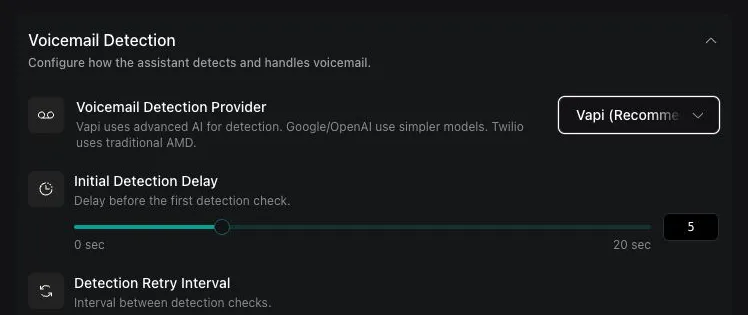
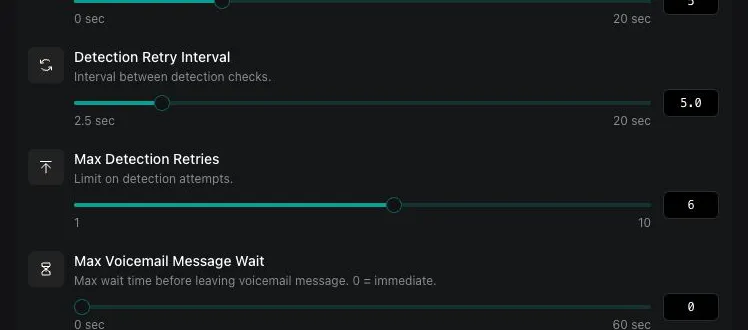
Advanced Configuration Options
For each detection method, you can fine-tune the following parameters:
Important: frequencySeconds has a minimum allowed value of 2.5 seconds.
These settings allow you to balance:
- Speed (how quickly voicemail is detected)
- Accuracy (reducing false positives)
- Cost (fewer detection attempts = lower API costs)
Important: beepMaxAwaitSeconds Configuration
The beepMaxAwaitSeconds parameter is critical for voicemail message timing:
- What it does: Sets the maximum time from call start to wait for a voicemail beep before the bot starts speaking its message
- If beep detected early: Bot speaks immediately after the beep (optimal)
- If no beep by timeout: Bot starts speaking the voicemail message anyway
- Risk of low values: Bot may start speaking before the actual beep and get cut off by the voicemail system
Setting too low a value (under 15-20 seconds) may cause your voicemail message to be cut off. Most voicemail systems play 10-20 seconds of greeting before the beep.
Recommended values:
- Conservative: 25-30 seconds (default: 30)
- Aggressive: 15-20 seconds (requires testing with your specific voicemail patterns)
- Range: 0-60 seconds
How Vapi Detection Works
Vapi’s detection engine combines:
- Gemini model-based detection (fast and highly accurate on common voicemail phrasing)
- Twilio beep detection (optional, for faster reaction to voicemail system beeps)
- Real-time call monitoring to react instantly if a human unexpectedly picks up
- Continuous voicemail polling during early call stages (detecting voicemail faster without waiting for a full timeout)
This hybrid approach means less call delay, fewer mistakes, and a much more natural call experience.
Complete Configuration Examples
Here are complete assistant configurations for different real-world scenarios:
Sales Outreach Assistant
This configuration optimizes for fast detection and professional voicemail delivery in sales scenarios:
Customer Support Callback Assistant
Optimized for high-accuracy detection and detailed voicemail messages:
Appointment Reminder Assistant
Balanced configuration for appointment confirmations with fallback voicemail:
Provider-Specific Configurations
Vapi Provider (Recommended)
Best balance of speed and accuracy:
Google Provider
Maximum accuracy for critical calls (best with audio detection):
OpenAI Provider
High accuracy with cost consideration (best with transcript detection):
Detection Types
Choose between two detection methods based on provider performance:
Provider-specific recommendations:
- Google: Use default
audiodetection for best accuracy - OpenAI: Use
type: "transcript"for optimal performance - Vapi: Use default
audiodetection
Pre-recorded Audio Messages
Instead of text-to-speech, you can use pre-recorded audio files for your voicemail messages. Simply provide the URL to your audio file in the voicemailMessage property:
Supported formats: .wav and .mp3 files
Pre-recorded audio messages provide consistent quality and pronunciation, especially useful for brand-specific messaging or complex information like phone numbers and website URLs.
Disabling Voicemail Detection
To completely disable voicemail detection for your assistant, set the voicemailDetection property to "off":
When voicemail detection is disabled, your assistant will continue the conversation normally regardless of whether it reaches a voicemail system.
Configuration Best Practices
Tuning for Different Scenarios
Cost Optimization Tips
- Lower maxRetries for high-volume campaigns
- Increase startAtSeconds to reduce false positives
- Use Vapi provider for best cost-to-accuracy ratio
- Tune beepMaxAwaitSeconds carefully - too low causes cut-off messages, too high delays voicemail delivery
Accuracy Optimization Tips
- Use Google provider for maximum accuracy
- Increase maxRetries for important calls
- Lower startAtSeconds for faster detection
- Tune frequencySeconds based on your voicemail patterns (minimum 2.5 seconds)
Troubleshooting Common Issues
False Positives (Detecting voicemail when human answers)
Symptoms: Assistant leaves voicemail message when human picks up
Solutions:
- Increase
startAtSecondsto 3-4 seconds - Switch to Google or OpenAI provider
- Increase
frequencySecondsto 3-4 seconds
Missed Voicemails (Not detecting actual voicemail)
Symptoms: Assistant continues talking to voicemail recording
Solutions:
- Decrease
startAtSecondsto 1-2 seconds - Increase
maxRetriesto 8-10 - Keep
frequencySecondsat minimum value (2.5 seconds)
Slow Detection
Symptoms: Takes too long to detect voicemail
Solutions:
- Use Vapi provider for fastest detection
- Decrease
startAtSeconds(frequencySeconds minimum is 2.5) - Ensure good audio quality
By using Vapi’s detection system, you’ll avoid the common pitfalls of voicemail detection, while creating a faster, smarter, and more professional experience for your users.
Related Documentation
- Voicemail Tool - Alternative assistant-controlled voicemail approach for maximum flexibility