

Inbound SMS
Let agents auto-start chats from incoming text messages (US only)
Overview
Vapi agents can automatically initiate a conversation when your number receives an inbound SMS.
Inbound SMS is currently supported only for Twilio US numbers with SMS enabled, and only for US ↔ US messaging. Messages sent from or to non‑US numbers are not supported.
When enabled, Vapi configures the Twilio Messaging webhook on your number so inbound texts start a session with your agent.
Prefer a walkthrough? Watch the video guide: Inbound SMS with Vapi
Requirements
- Twilio number in the US
- SMS capability enabled on that number (in Twilio and in Vapi)
- US-to-US messaging only
- Usage-based billing: Usage-based subscriptions need a saved payment method and, if they are less than 30 days old, one completed payment. Without these, Vapi receives the inbound SMS message and creates a session but does not send a reply or show an error. See Chat troubleshooting.
Set up from the Dashboard
Open the Twilio import form
Open the Dashboard, select Phone Numbers, and select Create Phone Number. Choose Import Twilio under Phone Number Options.
Import the number with SMS enabled
Enter the number and its Twilio credentials. Turn on SMS Enabled, then select Import from Twilio. Vapi will configure the Twilio Messaging webhook to route inbound texts to your agent.
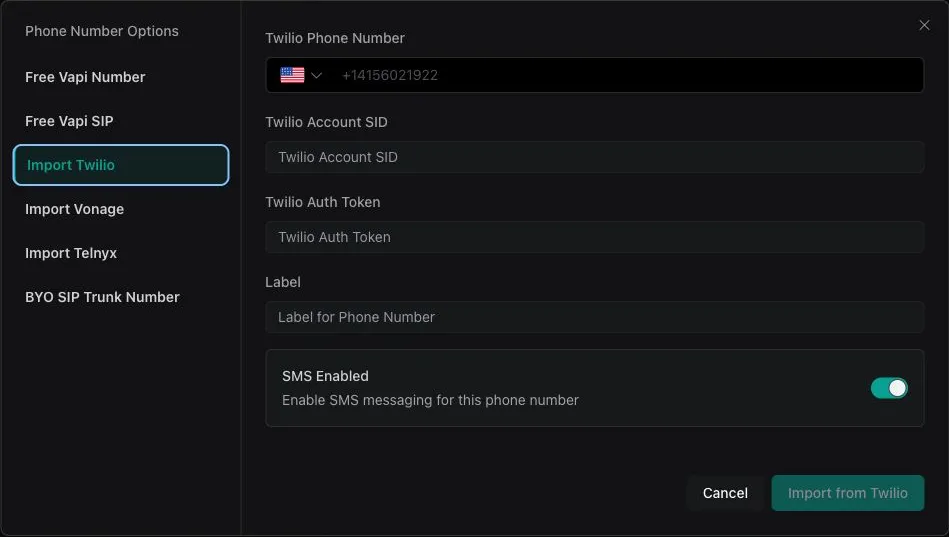
For the complete import workflow, see Import a Twilio number.
Set up via API
You can enable inbound SMS while creating or updating a Twilio phone number by setting smsEnabled: true.
Create or import a Twilio number with SMS enabled
Key fields:
- provider:
twilio - smsEnabled:
true(lets Vapi manage Twilio Messaging webhooks)
Controls whether Vapi configures the Twilio Messaging webhook during import/creation. If false, Vapi leaves your Twilio messaging URL unchanged.
Enable SMS on an existing number
Update your number to set smsEnabled: true if it was previously disabled.
Notes and limitations
- US-only: Both sender and recipient must be US numbers.
- Twilio only: Other telephony providers are not supported for inbound SMS at this time.
- Webhooks: With
smsEnabled: true, Vapi manages the Twilio Messaging webhook for you.
For full endpoint details, see the OpenAPI reference.
Next steps
Now that you have inbound SMS enabled:
- SMS chat - Learn how customers can have full conversations with your assistants via SMS
- Session management - Understand how SMS conversations maintain context automatically
- Chat quickstart - Explore the underlying chat technology powering SMS interactions