Simulations advanced

Pre-release
Master testing strategies and best practices for AI voice agent simulations

Overview

This guide covers advanced simulation strategies, testing patterns, and best practices for building robust test suites that ensure your AI voice agents work reliably in production.

You’ll learn:

  • Advanced scenario configuration (tool mocks, hooks)
  • Strategic testing approaches (smoke, regression, edge cases)
  • Performance optimization techniques
  • CI/CD integration strategies
  • Maintenance and troubleshooting methods

Advanced scenario configuration

Tool mocks

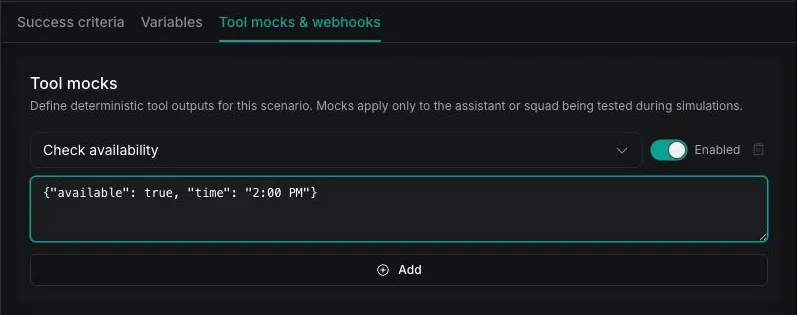
Mock tool call responses at the scenario level to test specific paths without calling real APIs. This is useful for:

  • Testing error handling paths
  • Simulating unavailable services
  • Deterministic test results
  • Faster test execution (no real API calls)
2

Add tool mocks

  1. Scroll to Tool Mocks section
  2. Click Add Tool Mock
  3. Tool Name: Enter the exact function name (e.g., bookAppointment)
  4. Result: Enter the JSON response to return:
    1{"status": "success", "confirmationId": "MOCK-12345"}
  5. Enabled: Toggle on/off to control when mock is active
  6. Click Save

Common tool mock patterns:

1{
2 "toolName": "bookAppointment",
3 "result": "{\"status\": \"success\", \"confirmationId\": \"APT-12345\", \"datetime\": \"2024-01-20T14:00:00Z\"}",
4 "enabled": true
5}
1{
2 "toolName": "bookAppointment",
3 "result": "{\"error\": \"Time slot no longer available\", \"availableSlots\": [\"14:30\", \"15:00\", \"15:30\"]}",
4 "enabled": true
5}
1{
2 "toolName": "checkInventory",
3 "result": "{\"error\": \"Request timeout\", \"code\": \"ETIMEDOUT\"}",
4 "enabled": true
5}
1{
2 "toolName": "processOrder",
3 "result": "{\"status\": \"partial\", \"itemsProcessed\": 2, \"itemsFailed\": 1, \"failedReason\": \"Item out of stock\"}",
4 "enabled": true
5}

Tool mock tips:

  • Mock tool names must exactly match the function name configured in your assistant’s tools
  • Use realistic error responses that match your actual API error formats
  • Create separate scenarios for success paths and error paths
  • Disable mocks (enabled: false) to test against real APIs

Simulation hooks

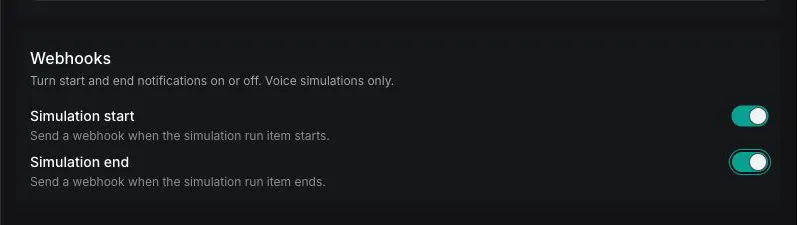
Trigger actions on simulation lifecycle events. Hooks are useful for:

  • Notifying external systems when tests start/end
  • Logging test execution to your own systems
  • Triggering follow-up workflows
  • Custom analytics and reporting

Hooks are only supported in voice mode. Hooks require vapi.websocket transport and will not trigger with vapi.webchat (chat mode).

1

Add hooks to scenario

  1. Go to SimulationsScenarios
  2. Open your scenario
  3. Scroll to Hooks section
  4. Click Add Hook
2

Configure hook

  1. Event: Select when to trigger:
    • simulation.run.started - When simulation run begins
    • simulation.run.ended - When simulation run ends
  2. Action Type: Select webhook
  3. Server URL: Enter your webhook endpoint
  4. Click Save

Webhook payload examples:

1// simulation.run.started webhook payload
2{
3 "event": "simulation.run.started",
4 "simulationId": "550e8400-e29b-41d4-a716-446655440003",
5 "runId": "550e8400-e29b-41d4-a716-446655440007",
6 "timestamp": "2024-01-15T09:50:05Z"
7}
8
9// simulation.run.ended webhook payload
10{
11 "event": "simulation.run.ended",
12 "simulationId": "550e8400-e29b-41d4-a716-446655440003",
13 "runId": "550e8400-e29b-41d4-a716-446655440007",
14 "timestamp": "2024-01-15T09:52:30Z",
15 "duration": 145,
16 "status": "passed",
17 "transcript": "...", // if include.transcript = true
18 "messages": [...], // if include.messages = true
19 "recordingUrl": "https://..." // if include.recordingUrl = true
20}

Using existing structured outputs

Instead of defining inline structured outputs in each scenario, you can reference structured outputs you’ve already created. This provides:

  • Reusability across multiple scenarios
  • Centralized management of evaluation criteria
  • Consistency in how data is extracted
  1. Go to Structured Outputs in the sidebar
  2. Create a new structured output or find an existing one
  3. Copy the ID
  4. In your scenario, select Use Existing when adding an evaluation
  5. Paste the structured output ID

When to use existing vs inline:

  • Existing (by ID): When the same evaluation criteria is used across multiple scenarios
  • Inline: For scenario-specific evaluations that won’t be reused

Testing strategies

Smoke tests

Quick validation that core functionality works. Run these first to catch obvious issues.

Purpose: Verify your assistant responds and basic conversation flow works before running comprehensive tests.

1{
2 "name": "Smoke Test - Basic Response",
3 "instructions": "Say hello and ask if the assistant can hear you.",
4 "evaluations": [
5 {
6 "structuredOutput": {
7 "name": "assistant_responded",
8 "schema": {
9 "type": "boolean",
10 "description": "Whether the assistant provided any response"
11 }
12 },
13 "comparator": "=",
14 "value": true
15 }
16 ]
17}

Characteristics:

  • Minimal evaluation criteria (just check for any response)
  • Fast execution (simple instructions)
  • Run before detailed tests
  • Use chat mode for speed

When to use:

  • Before running expensive voice test suites
  • After deploying configuration changes
  • As health checks in monitoring
  • Quick validation during development

Regression tests

Ensure fixes and updates don’t break existing functionality.

Purpose: Validate that known issues stay fixed and features keep working.

  1. Name scenarios with “Regression: ” prefix
  2. Include issue ticket number in the name
  3. Add the exact scenario that previously failed
  4. Document what was fixed

Example:

  • Name: “Regression: Appointment Parsing Bug #1234”
  • Instructions: Scenario that triggered the bug

Best practices:

  • Name tests after bugs they prevent
  • Include ticket/issue numbers
  • Add regression tests when fixing bugs
  • Run full regression suite before major releases

Edge case testing

Test boundary conditions and unusual inputs your assistant might encounter.

Common edge cases to test:

1{
2 "name": "Edge Case - Ambiguous Request",
3 "instructions": "Make a vague, unclear request like 'I need something done' without specifying what you want.",
4 "evaluations": [
5 {
6 "structuredOutput": {
7 "name": "asked_for_clarification",
8 "schema": {
9 "type": "boolean",
10 "description": "Whether the assistant asked for more details"
11 }
12 },
13 "comparator": "=",
14 "value": true
15 }
16 ]
17}
1{
2 "name": "Edge Case - Topic Switch",
3 "instructions": "Start asking about booking an appointment, then suddenly switch to asking about cancellation policies mid-conversation.",
4 "evaluations": [
5 {
6 "structuredOutput": {
7 "name": "handled_topic_switch",
8 "schema": {
9 "type": "boolean",
10 "description": "Whether the assistant smoothly transitioned to the new topic"
11 }
12 },
13 "comparator": "=",
14 "value": true
15 }
16 ]
17}
1{
2 "name": "Edge Case - Interruption Handling",
3 "instructions": "Interrupt the assistant mid-sentence with a new question. See if it handles the interruption gracefully.",
4 "evaluations": [
5 {
6 "structuredOutput": {
7 "name": "handled_interruption",
8 "schema": {
9 "type": "boolean",
10 "description": "Whether the assistant stopped and addressed the interruption"
11 }
12 },
13 "comparator": "=",
14 "value": true
15 }
16 ]
17}
This edge case requires voice mode (vapi.websocket) to test actual audio interruptions.
1{
2 "name": "Edge Case - Invalid Date",
3 "instructions": "Try to book an appointment for 'the 45th of Octember' - an obviously invalid date.",
4 "evaluations": [
5 {
6 "structuredOutput": {
7 "name": "handled_invalid_date",
8 "schema": {
9 "type": "boolean",
10 "description": "Whether the assistant politely asked for a valid date"
11 }
12 },
13 "comparator": "=",
14 "value": true
15 }
16 ]
17}

Edge case categories to cover:

  • Input boundaries: Empty, maximum length, special characters
  • Data formats: Invalid dates, malformed phone numbers, unusual names
  • Conversation patterns: Interruptions, topic changes, contradictions
  • Emotional scenarios: Frustrated caller, confused caller, impatient caller

Best practices

Evaluation design principles

Single responsibility

Each evaluation should test one specific outcome.

Good: “Was the appointment booked?”

Bad: “Was the appointment booked, confirmed, and email sent?”

Clear naming

Use descriptive names that explain what’s being tested.

Good: “Booking - Handles Unavailable Slot”

Bad: “Test 1” or “Scenario ABC”

Realistic personalities

Model test personalities after actual customer types.

Consider: decisive, confused, impatient, detail-oriented, non-native speakers

Measurable criteria

Use boolean or numeric structured outputs that produce clear pass/fail results.

Avoid subjective criteria that are hard to evaluate consistently.

Choosing voice vs chat mode

ScenarioRecommended ModeReason
Rapid iteration during developmentChat (vapi.webchat)Faster, cheaper
Testing speech recognition accuracyVoice (vapi.websocket)Tests actual STT
Testing voice/TTS qualityVoice (vapi.websocket)Tests actual TTS
Testing interruption handlingVoice (vapi.websocket)Requires audio
CI/CD pipeline testsChat (vapi.webchat)Speed and cost
Pre-production validationVoice (vapi.websocket)Full end-to-end
Testing hooks/webhooksVoice (vapi.websocket)Hooks require voice

CI/CD integration

Automate simulation runs in your deployment pipeline.

Basic workflow

1# .github/workflows/test-assistant.yml
2name: Test Assistant Changes
3
4on:
5 pull_request:
6 paths:
7 - 'assistants/**'
8 - 'prompts/**'
9
10jobs:
11 run-simulations:
12 runs-on: ubuntu-latest
13 steps:
14 - name: Run smoke tests (chat mode)
15 run: |
16 # Create a simulation run
17 RUN_ID=$(curl -s -X POST "https://api.vapi.ai/eval/simulation/run" \
18 -H "Authorization: Bearer ${{ secrets.VAPI_API_KEY }}" \
19 -H "Content-Type: application/json" \
20 -d '{
21 "simulations": [{"type": "simulationSuite", "simulationSuiteId": "${{ vars.SMOKE_TEST_SUITE_ID }}"}],
22 "target": {"type": "assistant", "assistantId": "${{ vars.STAGING_ASSISTANT_ID }}"},
23 "transport": {"provider": "vapi.webchat"}
24 }' | jq -r '.id')
25
26 echo "Run ID: $RUN_ID"
27
28 # Poll for completion
29 while true; do
30 STATUS=$(curl -s "https://api.vapi.ai/eval/simulation/run/$RUN_ID" \
31 -H "Authorization: Bearer ${{ secrets.VAPI_API_KEY }}" | jq -r '.status')
32
33 if [ "$STATUS" = "ended" ]; then
34 break
35 fi
36
37 sleep 10
38 done
39
40 # Check results
41 RESULT=$(curl -s "https://api.vapi.ai/eval/simulation/run/$RUN_ID" \
42 -H "Authorization: Bearer ${{ secrets.VAPI_API_KEY }}")
43
44 PASSED=$(echo $RESULT | jq '.itemCounts.passed')
45 FAILED=$(echo $RESULT | jq '.itemCounts.failed')
46
47 if [ "$FAILED" -gt 0 ]; then
48 echo "Simulations failed: $FAILED"
49 exit 1
50 fi
51
52 echo "All simulations passed: $PASSED"

Advanced patterns

Run full simulation suite against staging before promoting to production:

$# Run comprehensive tests against staging
$./scripts/run-simulation-suite.sh \
> --suite-id "$REGRESSION_SUITE_ID" \
> --target-assistant "$STAGING_ASSISTANT_ID" \
> --transport "vapi.websocket" \
> --iterations 3
$
$# Only deploy to production if all pass
$if [ $? -eq 0 ]; then
$ ./scripts/deploy-to-production.sh
$fi

Run full regression suite nightly:

1# .github/workflows/nightly-regression.yml
2on:
3 schedule:
4 - cron: '0 2 * * *' # 2 AM daily
5
6jobs:
7 regression-suite:
8 runs-on: ubuntu-latest
9 steps:
10 - name: Run full regression (voice mode)
11 run: ./scripts/run-simulation-suite.sh --full-regression
12
13 - name: Notify on failures
14 if: failure()
15 run: |
16 # Send Slack notification
17 curl -X POST $SLACK_WEBHOOK_URL \
18 -d '{"text": "Nightly simulation regression failed!"}'

Block deployment if pass rate falls below threshold:

$RESULT=$(curl -s "https://api.vapi.ai/eval/simulation/run/$RUN_ID" \
> -H "Authorization: Bearer $VAPI_API_KEY")
$
$TOTAL=$(echo $RESULT | jq '.itemCounts.total')
$PASSED=$(echo $RESULT | jq '.itemCounts.passed')
$
$PASS_RATE=$((PASSED * 100 / TOTAL))
$
$if [ $PASS_RATE -lt 95 ]; then
$ echo "Pass rate $PASS_RATE% below threshold 95%"
$ exit 1
$fi

Maintenance strategies

Regular review cycle

1

Weekly: Review failed tests

Investigate all failures. Update tests if requirements changed, or fix assistant if behavior regressed.

2

Monthly: Audit test coverage

Review simulation suite completeness:

  • All critical user flows covered?
  • New features have tests?
  • Deprecated features removed?
3

Quarterly: Refactor and optimize

  • Remove duplicate simulations
  • Update outdated scenarios
  • Optimize personalities for cost
  • Document test rationale

When to update simulations

TriggerAction
Assistant prompt changesReview affected simulations
New feature addedCreate simulations for new feature
Bug fixedAdd regression test
User feedback reveals edge caseAdd edge case simulation
Business requirements changeUpdate evaluation criteria

Troubleshooting

Common issues

IssueCauseSolution
Simulation always failsEvaluation criteria too strictReview structured output schema and expected values
Run stuck in “running”Assistant not respondingCheck assistant configuration, verify credentials
Inconsistent resultsNon-deterministic behaviorIncrease iterations, use more specific instructions
No audio in recordingUsing chat modeSwitch to vapi.websocket transport
Hooks not triggeringUsing chat modeHooks require vapi.websocket transport
Tool mocks not workingWrong tool nameVerify tool name matches exactly

Debugging tips

1

Check run status

$curl "https://api.vapi.ai/eval/simulation/run/$RUN_ID" \
> -H "Authorization: Bearer $VAPI_API_KEY" | jq '.status, .endedReason'
2

Review individual run items

$curl "https://api.vapi.ai/eval/simulation/run/$RUN_ID/item" \
> -H "Authorization: Bearer $VAPI_API_KEY" | jq '.[].status'
3

Check conversation transcript

In the Dashboard, click on a failed run item to see the full conversation transcript and evaluation results.

4

Test assistant manually

If simulations consistently fail, test your assistant manually in the Dashboard to verify it’s working correctly.

Getting help

Include these details when reporting issues:

  • Simulation run ID
  • Scenario and personality IDs
  • Transport mode used (voice/chat)
  • Expected vs actual behavior
  • Assistant configuration

Resources:

Next steps

Summary

Key takeaways for advanced simulation testing:

Configuration:

  • Use tool mocks to test error paths without real API calls
  • Use hooks for external notifications (voice mode only)
  • Reference existing structured outputs for consistency

Testing strategy:

  • Start with smoke tests, then regression, then edge cases
  • Use chat mode for speed, voice mode for final validation
  • Create personalities based on real customer types

CI/CD:

  • Automate smoke tests in PR pipelines
  • Run full regression before production deploys
  • Set quality gate thresholds

Maintenance:

  • Review failures weekly
  • Audit coverage monthly
  • Add regression tests when fixing bugs