

Configure blind transfer modes
Blind transfer sends the active call to a destination without speaking to the destination first. Use it when the destination can accept the call immediately and does not need a spoken introduction.
This guide starts with an existing transfer call tool. To create the tool, configure destinations, and add it to an assistant, follow Set up the Transfer Call tool.
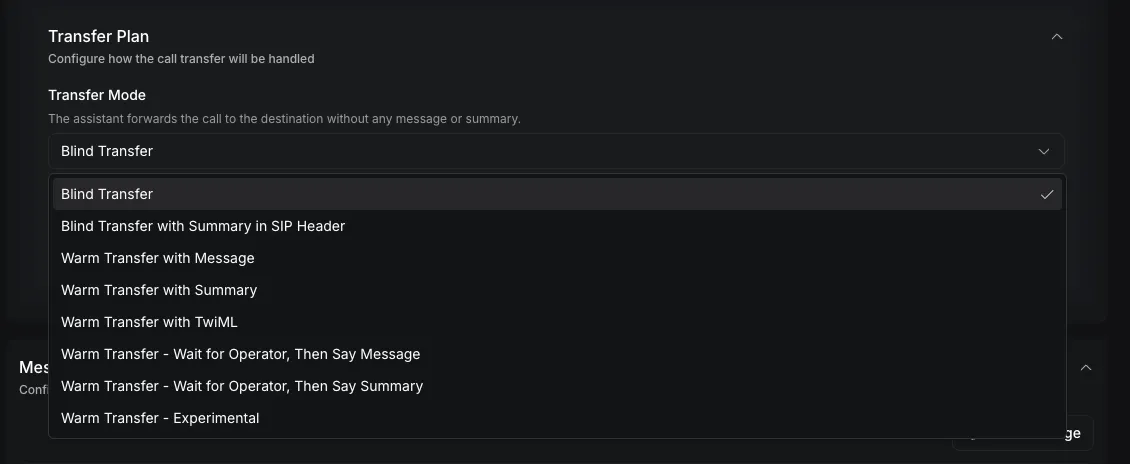
Choose a blind transfer mode
Both blind modes transfer the caller immediately. The summary variant adds context for a Session Initiation Protocol (SIP) system without speaking that context aloud.
Blind transfer is the default. If transferPlan is omitted, Vapi uses blind-transfer.
Neither blind mode waits for an operator to accept the call. The assistant-forwarded-call ended reason means the transfer started, not that the destination answered.
What the caller and destination hear
- The caller hears the transfer message. See Configure transfer messages.
- The original assistant leaves the call, and the transfer starts.
- The destination rings. When it answers, the caller and destination are connected. Neither one hears an introduction.
How the transfer reaches the destination depends on the phone provider:
If voicemail answers, the transfer counts as answered and the caller is connected to the voicemail.
With blind-transfer-add-summary-to-sip-header, the summary goes in the X-Transfer-Summary SIP header and is never spoken. Only Vapi numbers and bring-your-own SIP trunks send the header.
If the transfer fails
The caller doesn’t return to the original assistant by default. What happens depends on the phone provider.
Twilio, Telnyx, and Vonage: Vapi leaves the call when the transfer starts, so a busy, unanswered, or failed destination can’t return the caller to the assistant. The call ends with assistant-forwarded-call. Check the provider’s call record to see whether the destination answered.
Vapi numbers and bring-your-own SIP trunks: Vapi watches the transfer and records the outcome:
To return the caller to the assistant after a failed transfer, add a fallbackPlan to the destination’s transferPlan. The assistant says fallbackPlan.message, which defaults to Could not transfer the call. Then:
- With
endCallEnabledset tofalse, the assistant keeps helping the caller. - With
endCallEnabledset totrueor not set, the call ends.
With the bye verb, Vapi can recover only from a failure it detects before it leaves the call. See Return the caller to the assistant after a failed transfer.
Configure blind transfer
Update the transfer plan on each destination that should use blind transfer.
Dashboard
curl
Open the transfer destination
In the Vapi Dashboard, open Tools, select the transfer call tool, and expand Destinations. Select the phone-number or SIP destination you want to configure.
Select the transfer mode
Expand Transfer Plan. Under Transfer mode, select Blind transfer or Blind transfer with summary in SIP header.
Choose the SIP verb
Under SIP Verb, select the behavior required by your SIP infrastructure:
- REFER — hand the call to the destination (default) sends a SIP REFER.
- Dial — bridge a new outbound leg to the destination keeps Vapi in the call path while dialing.
- Bye — hang up the Vapi leg only; no transfer is placed and the destination is not dialed is for SIP systems that complete the transfer independently.
If you select Dial, set Dial Timeout (seconds) from 1 to 600 seconds. The default is 60 seconds.
Choose a SIP verb
The SIP verb affects only calls running on SIP telephony. Other telephony providers ignore this setting.
Do not use bye when you expect Vapi to dial the destination. It intentionally places no destination call.
Call state after a SIP transfer
The refer and dial verbs leave the call in different states once the transfer starts.
referhands the call off with a SIP REFER. Vapi leaves the call when the transfer starts, and the destination continues the call without Vapi.dialbridges a new outbound leg to the destination. The SIP layer keeps the caller and destination connected until either side hangs up, but the assistant leaves the call when the transfer starts. You can’t unbridge a connecteddialtransfer and return the caller to the original assistant.
With either verb, Vapi’s recording and transcript stop when the transfer starts. To capture the rest of the call, record it in a system that stays in the media path, such as your SIP provider or PBX.
If a refer or dial transfer is busy, unanswered, or fails, see If the transfer fails.
Verify the transfer
Place a test call and trigger the transfer. Confirm that the destination rings and that the customer and destination can hear each other.
For blind-transfer-add-summary-to-sip-header, inspect the SIP signaling at the receiving private branch exchange (PBX) or provider. Confirm that the destination INVITE or REFER flow contains X-Transfer-Summary and that the value contains the expected summary.
An assistant-forwarded-call ended reason confirms that Vapi initiated the transfer. It does not confirm that the downstream PBX or provider completed it.
Troubleshooting
For provider diagnostics and packet capture guidance, follow Troubleshoot call transfers.
API reference
The Update Tool API reference documents the transfer destination and transfer-plan fields accepted when updating a reusable tool.