

Handle API Request Tool latency and retries
API Request Tools do not currently retry a request after a non-2xx response or a timeout, even when backoffPlan is set. Set a timeout and tool messages so the assistant can handle a slow or failed request.
Prerequisites
- An existing API Request Tool
- For cURL requests, a Vapi API key and the tool ID
Choose a timeout
timeoutSeconds controls how long the tool waits for an API request. It defaults to 20 seconds and accepts values from 1 to 300 seconds.
When the timeout expires, the assistant receives Request timed out. Vapi stops waiting for the response, but the destination API may continue processing the request. Choose a timeout that accommodates the API’s normal response time without leaving the caller waiting unnecessarily.
The Dashboard currently exposes tool messages but not timeoutSeconds. Use the API to set the timeout. If you omit timeoutSeconds, it defaults to 20 seconds.
To observe timeouts and failed responses before production, use a non-production endpoint you control that can delay responses or return failure statuses. Check that endpoint’s logs to see whether it received or completed a request.
Protect the coffee-order request
Creating an order changes server state. A timed-out request may still create the order, so check its outcome before submitting it again. If your order API supports an idempotency key or another form of duplicate protection, use it so a repeated request cannot create a second order.
The following configuration applies a 20-second timeout to the coffee-order quickstart and adds messages for the caller.
Dashboard
cURL
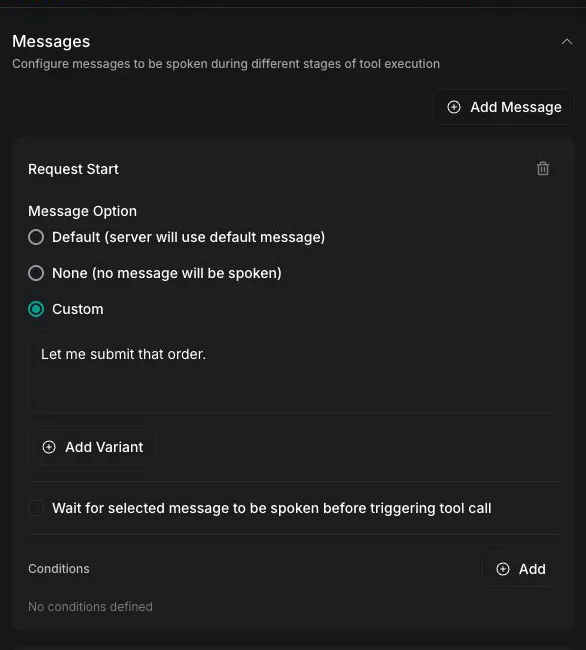
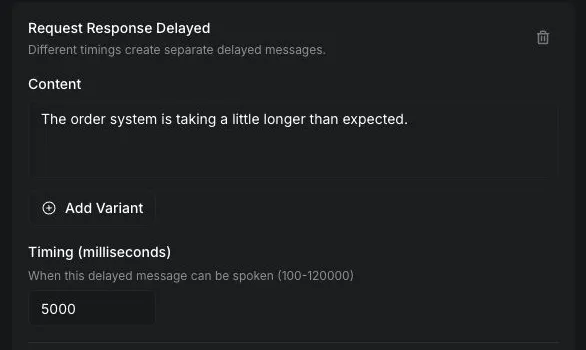
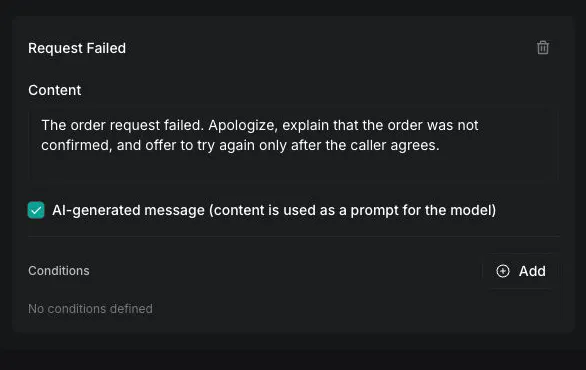
Configure tool messages
Expand Messages. Set Request Start to Custom, then add the remaining message stages with Add Message:
Do not add Request Complete. The model can then use the API response to read the server-calculated total and order number to the caller.
Understand retries and timeouts
An API Request Tool accepts a backoffPlan in its configuration, but the current execution path does not use it for automatic retries. A non-2xx response or a timeoutSeconds timeout ends that tool invocation without a retry. Values such as maxRetries and excludedStatusCodes do not change this behavior for API Request Tools.
The assistant may invoke the tool again as a separate action. Treat that as a new request, and check whether repeating it is safe. Server URL webhook delivery uses a separate retry path; its backoffPlan behavior does not establish API Request Tool retry behavior.
To confirm how many requests reached your API, check the destination endpoint’s logs.
Retry through a service you control
For an upstream request that is safe to repeat, point the API Request Tool at a service or proxy you control. That service can make a bounded number of upstream attempts, wait between them, and return a result before the tool’s timeoutSeconds expires.
Do not ask the assistant to repeat a state-changing request after a timeout until your service can determine whether the first request completed.
Keep the caller informed
Tool messages control what the caller hears while a request is running and after it finishes.
For request-complete and request-failed, the default assistant role speaks the configured content instead of asking the model to respond. Use the system role when the response should account for tool results or conversation context.
For the complete field definitions, see the Create Tool and Update Tool API references. To diagnose failed tool calls, see Troubleshoot tools.