

Campaign webhooks
Expand Webhook settings (optional) on the Campaign Details step to connect the campaign to your server. A campaign can make a blocking eligibility request before each call and send asynchronous campaign or contact events.
Configure the Server URL
Dashboard
cURL
Add the endpoint that should receive requests under Server URL. The Dashboard also lets you set a 1–30 second timeout, attach a credential, add HTTP headers, and route requests through Vapi’s static IP range (167.150.224.0/23) for firewall allowlisting.
Both Pre-dial webhook and Server messages require a Server URL.
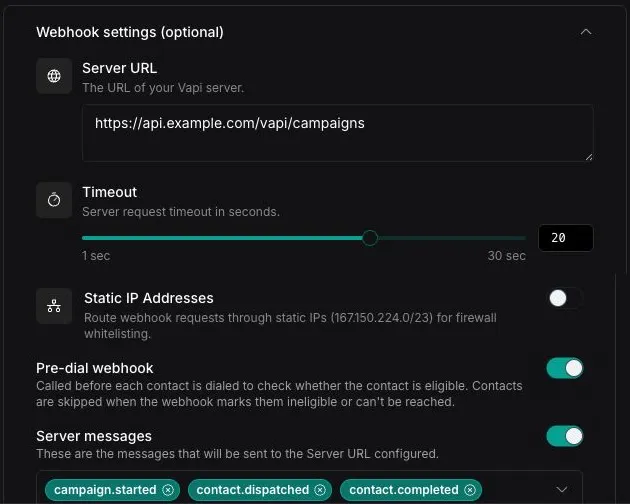
Filter contacts before dialing
Enable Pre-dial webhook to ask your server whether each contact is eligible immediately before Vapi places the call. Because this request blocks dispatch, keep the handler fast and idempotent.
Before each contact is dispatched, Vapi sends:
The contact can also include assistantOverrides or squadOverrides, including dynamic variable values supplied for that contact.
Return true to allow the call:
Return false to skip it:
The response must be valid JSON with a Boolean eligible field.
The Dashboard allows a timeout of up to 30 seconds for this check. Use the pre-dial webhook for suppression lists, consent checks, account-state queries, or other rules that must be evaluated against your backend at call time.
Receive campaign events
Enable Server messages, then select the events that Vapi should send:
campaign.startedcampaign.endedcampaign.cancelledcampaign.archivedcontact.dispatchedcontact.completedcontact.failedcontact.skippedcontact.predial-failed
Every selected event uses the same envelope. For example, contact.completed sends:
The data object depends on eventType:
Campaign events are asynchronous. Return any successful 2xx response; Vapi does not use the response body to control the campaign. Process duplicate deliveries safely and do not depend on events arriving in a particular order.
A campaign event reports lifecycle data, not the complete call record. To receive the transcript, recording information, analysis, and other call details, configure the assistant—or the relevant assistant in a squad—to send end-of-call-report. Use callId to associate that report with the campaign contact event.
The default server timeout is 20 seconds. Campaign event delivery does not retry by default; configure a Server URL backoff plan when your integration requires retries.