

Customize API Request tool requests
Add headers, static fields, Liquid values, and authentication while keeping model-generated and server-resolved data separate
Now that your coffee-order assistant can submit a basic order, you can add the information your API needs to process the customer’s order. In this guide, you’ll add HTTP headers, fixed application metadata, call-time Liquid values, and authentication while keeping customer-provided values in the model-generated request body. Separating these values makes requests more predictable, prevents the model from inventing trusted application data, and gives your server the context it needs to validate and route each request.
Prerequisites
- An existing API Request Tool
- An HTTPS endpoint that returns JSON
- For cURL requests, a Vapi API key and the tool ID
Choose where each value comes from
Use the request body schema for values the caller provides or the model infers. Use static body fields for values your application or the call already knows.
For the full static-parameter behavior, supported value types, and trust model, see Static variables and aliases.
Do not put access tokens or other secrets in plain-text request headers or body fields. Use a Vapi credential for authentication.
Configure the request
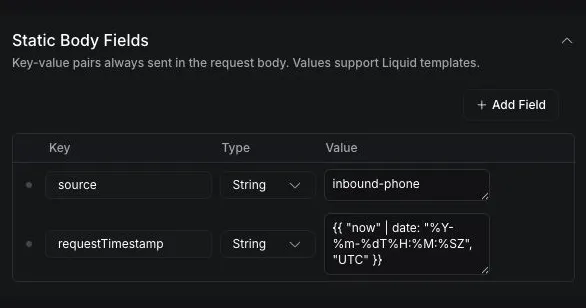
The configuration below updates createCoffeeOrder with the X-Docs-Example and X-Docs-Call-Type headers and the source and requestTimestamp static body fields. The endpoint continues to receive customerName, productId, and quantity from the model.
Dashboard
cURL
Configure the endpoint
Under Base Configuration, set Request URL to https://vapi-docs-orders.val.run/ and Request HTTP Method to POST.
Set the HTTP method explicitly. API Request Tools support GET, POST, PUT, PATCH, and DELETE. See the Create Tool API reference for the complete API Request Tool schema.
Define the model-generated body
Under Request Body, add these required properties:
Set the productId description to The product the customer confirmed. Then enable Lock schema (no additional properties).
Add request headers
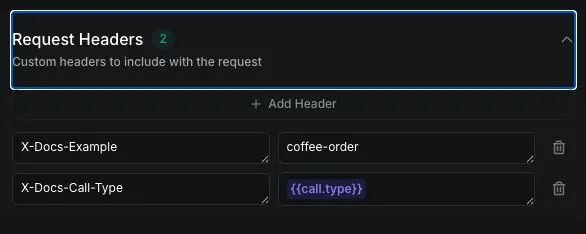
Expand Request Headers, then add these string headers:
Use request headers for non-sensitive HTTP metadata. The call.type Liquid value resolves when the tool runs.
Define model-generated request values
The body JSON Schema is the source of truth for the arguments the model can generate. For requests with a JSON body, Vapi uses those arguments to construct the body sent to the endpoint.
Write a specific description for every property. Add required properties to required, and constrain known values with enum, a format, or another supported schema rule.
Do not define a separate function.parameters schema for an API Request Tool. Vapi derives the model-facing arguments from body, so a separate function.parameters schema is not used at runtime. The API can still store that schema without returning an error.
Use Liquid values at request time
Liquid values resolve when the API Request Tool runs. You can use them in the request URL, request header values, and static body field values.
In the request configuration above, X-Docs-Call-Type uses {{ call.type }} for direct substitution, while requestTimestamp uses the LiquidJS date filter to generate an ISO-8601 UTC timestamp. See Default variables for the complete runtime-variable list and Advanced date and time usage for formatting syntax.
Authenticate requests
An API Request Tool can reference a reusable Custom Credential through its credentialId. This endpoint credential is separate from the Vapi API key used to create or update the tool.
Dashboard
cURL
Expand Authorization, then choose an existing option from Credential. To create or manage credentials, see Server authentication.
Do not place endpoint tokens in the tool description, prompt, request schema, static body fields, or plain-text headers. When you set credentialId, do not also configure an Authorization request header.
The public coffee-order endpoint does not require authentication. Attach a credential only when configuring a protected endpoint that you control.
Verify the request
Place an inbound test call after publishing the tool. The public endpoint returns a sanitized requestContext object when it detects any advanced configuration field:
Each value should be true. The endpoint validates the call type and request timestamp without returning a call identifier or caller phone number.
If the request fails, compare the saved tool configuration with the endpoint’s expected HTTP method, URL, headers, and JSON body. The endpoint must return JSON for a successful response. For broader tool-call issues, see Troubleshoot tools.