

How versioning works with assistants and tools
How version pinning works
Assistants and tools are versioned independently, but an assistant configuration records which version of each tool to use. You can select a numbered version or Current, which appears as Latest when the menu is closed. When you publish the assistant, Vapi saves those selections in the assistant version.
Choose a tool version in the Dashboard
Open the assistant
Open the Dashboard, select Assistants, and select the assistant that uses the tool.
Choose the tool version
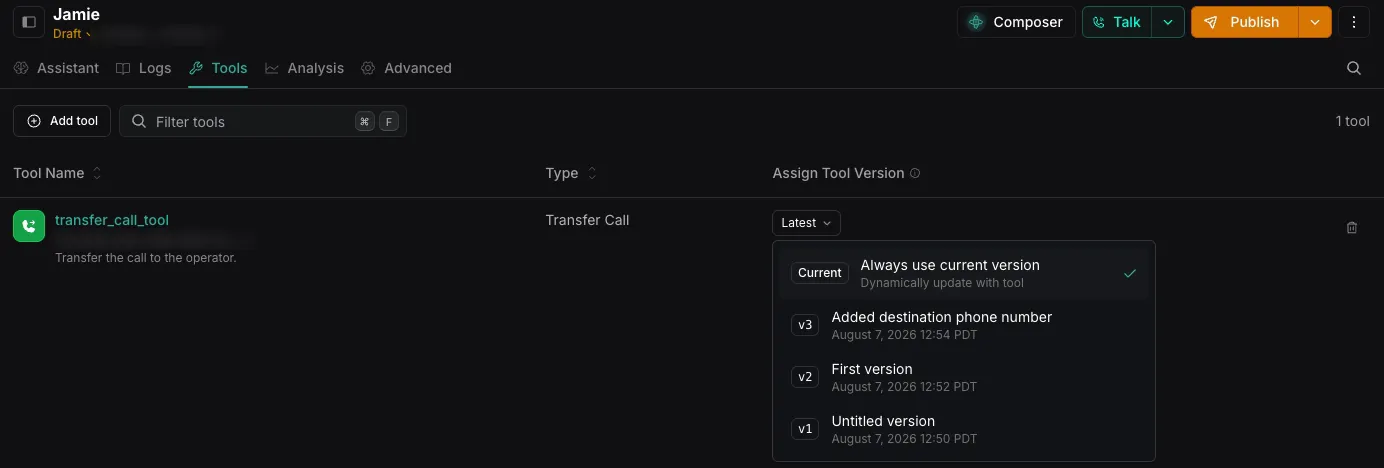
Under Assign Tool Version, open the version menu for the tool. Choose one of these options:
- Current: Always use the tool’s current version. The closed menu displays Latest.
- Numbered version: Pin the assistant to a specific version, such as v3. The assistant stays on that version until you change the selection and publish the assistant again.
Use the latest tool version through the API
When you create or update an assistant through the API, omit the tool version to use Latest. The assistant then uses the newest published version of that tool.
How restoring an assistant affects tools
When you restore an assistant version, Vapi immediately creates a new current assistant version with its saved tool version selections. A specific tool version returns to the saved selection. A tool set to Latest continues to use its newest published version.
For example:
- At v6, the assistant uses Tool A v4 and Tool B v6.
- The assistant’s v5 configuration used Tool A v2 and Tool B v4.
- You restore assistant v5. Vapi creates assistant v7, makes it current, and restores the selections for Tool A v2 and Tool B v4.
- If Tool B was set to Latest in assistant v5, it continues to use the newest published Tool B version.