

End call phrases
End call phrases are configured phrases that end a call after the assistant says them. A customer can initiate the closing exchange by saying goodbye, but the customer’s words do not trigger the match directly. The assistant must respond with a configured phrase, such as “have a good day.”
To let the model decide when to end the call instead, use the Hang Up tool. For the differences between end call phrases and the Hang Up tool, see Compare the Hang Up tool and end call phrases.
The typical sequence is:
- The customer indicates that the conversation is over.
- The assistant responds with a configured end call phrase.
- Vapi detects the phrase in the assistant’s transcript.
- Vapi waits for the assistant to finish speaking, then ends the call.
How phrase matching works
Matching is case-insensitive and checks for each phrase as a substring of the assistant’s transcript. After a match, Vapi lets the assistant finish speaking before ending the call. Specific multi-word phrases are safer than short conversational words.
Your assistant’s prompt controls when it says the configured phrase. Instruct the assistant to use the phrase when the customer ends the conversation or when the assistant has completed its task.
Avoid unnecessary punctuation and whitespace inside a phrase. A short phrase such as bye can match unintended assistant speech and end the call too early.
Configure via Dashboard
Select an assistant
Open the Dashboard. Select Assistants, then select the assistant you want to configure.
Find the end call settings
In the assistant editor, open the Advanced tab and find End Call Message and End Call Phrases.
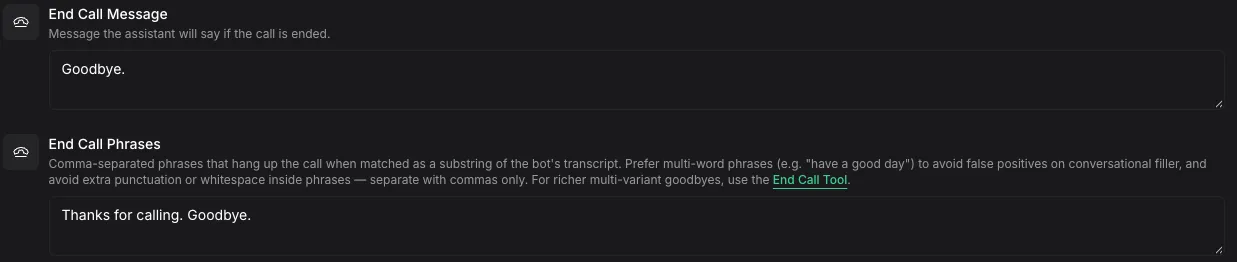
Enter end call phrases
In End Call Phrases, enter phrases as a comma-separated list. Use specific phrases, for example, goodbye, take care, have a good day.
API field
Use endCallPhrases when you create or update an assistant. The field is an array of strings, and each phrase must contain 2–140 characters.
Choose phrases that avoid false matches
Use phrases that are specific to the end of a conversation. Test each phrase against the assistant’s normal speech so common words do not end calls unexpectedly.
Compare end call phrases and the Hang Up tool
Both options let an assistant end a call, but they support different decision patterns.
Troubleshoot unexpected call endings
Calls ended by a matched phrase use the assistant-said-end-call-phrase ended reason. This is an expected call ending, not a call error.
See call end reasons for the complete list of ended reasons. For additional diagnostic guidance, see Troubleshoot call errors.