

Build with tools
In a GPT-Live assistant, the reasoner calls your tools. The speaker never calls them directly: it delegates, the reasoner decides which tool to use, and it returns what it found for the speaker to use in the conversation. Your service decides what actually happens.
This page uses an appointment assistant as its example. It has four tools of its own, plus Vapi’s built-in endCall:
Function tools are covered in general in Function tools. This page covers what matters when a GPT-Live assistant uses them.
Before you start
- A GPT-Live assistant. The Quickstart creates one.
- For custom function tools, a server that handles Vapi’s tool calls, protected with a credential.
- Speaker and reasoner prompts that say when to delegate and how to use each tool. Design conversations shows a full pair for this example.
Design tool inputs and results
A tool’s inputs and results shape the conversation as much as the prompts do.
Return enough to answer the likely follow-up. The example lookup takes a service, location, and date, and returns every open time for that day. If the caller adds “ideally after three” while it runs, the result still answers the request, and the assistant can filter it without another lookup. A different day or location changes the request, so it needs a new lookup. Keep results short even when they’re complete.


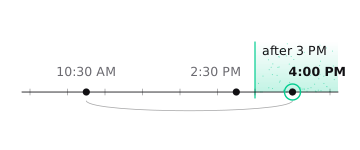

Echo the request details. Include the date and location in each result. When the caller changes their mind during a lookup, the earlier result may still come back, and the details make it easy to recognize as out of date.
Say what didn’t happen, as well as what did. “Availability only. Nothing has been booked” helps the assistant avoid overstating a lookup.
Keep results plain. The reasoner passes what matters to the speaker, so leave out Markdown and long explanations.
Make failures specific, with the next step: “That time is no longer available. Look up availability again.”
The tool response contract
Vapi sends a tool-calls server message to your server URL. Read message.toolCallList, run each call, and respond with HTTP 200 and one entry per call:
Use the toolCallId from the request. Use result for success and error for failure. Both must be flat strings, so serialize structured data. Return HTTP 200 even when a call fails, and report the failure in error. See Function tools for the full contract.
Actions that change state
Lookups are safe to repeat. Bookings and cancellations aren’t, so they need more care from both the prompts and your service.
Get the caller’s agreement first
A caller choosing a time is a selection, not agreement to book. Have the speaker read back the details and ask, and have the reasoner book only after the caller clearly says yes. Design conversations shows the prompt wording.
A tool call alone doesn’t establish whether the caller heard the details and agreed to them. Prompts guide the model, but they don’t enforce approval. If an action needs a stronger confirmation, enforce it in your service.
Check prerequisites in your service
Before an action runs, check what your service can:
- The time came from a real lookup and is still open. Someone else may have taken it.
- The request doesn’t conflict with a booking already made, such as a second booking for the same caller when they meant to move the first.
- A repeated request doesn’t create a second booking. Use the
toolCallIdor your own operation ID to recognize a retry, and return the original outcome.
Tool calls can arrive together. The reasoner can request several at once, and they can run concurrently, so enforce any required order, such as lookup before booking, in the service.
Handle uncertain outcomes
A request can time out after your service has already made the booking. Don’t report “nothing was booked” from a timeout alone. Check the booking record before retrying, and reuse the same operation ID so a retry can’t book twice. When the outcome is unknown, the assistant should say so and offer to check.
Changes to a completed action
If your service moves a booking in two operations—cancel the old one, then book the new one—account for what happens if only the first succeeds. Have the reasoner look up the new time and get the caller’s agreement first, then follow your service’s change procedure. If the new booking fails after the cancellation, the assistant should say exactly that: the original booking was cancelled and the new time wasn’t booked.
Interrupting the assistant doesn’t cancel work already running. See When callers change the request.
Slow and external work
A normal function tool makes the reasoner wait for your webhook’s response. The conversation carries on meanwhile, as described in While work is running, and the reasoner returns the result for the speaker to use. This is the right choice when the caller is waiting for the answer.
Set async: true on a function tool when the reasoner shouldn’t wait for it, for example when the result doesn’t affect what happens next in the call. Vapi records the call as pending and the reasoner carries on. Your webhook still returns the final result in its response to the original request, matched by toolCallId. When that response arrives, the result is added to the reasoner’s history and given to the speaker as quiet context. The speaker can use it when it’s relevant, but the result isn’t guaranteed to be announced as soon as it arrives. If the caller needs to hear it, use a normal tool.
Work that finishes after your webhook has responded is different. If your handler returns “queued” and a job keeps running elsewhere, nothing updates the conversation when the job finishes. Give the reasoner a status tool, such as checkOrderStatus, and tell it when to use it. Report a queued job as queued, never as done.
Ending the call doesn’t undo work your service has already started. Don’t assume a hangup cancels an in-flight request; check its status in your service.
While an async call or external job is pending, idle check-ins can resume if the caller goes quiet. See When the caller goes quiet.
Answer questions from your content
getServiceInfo is a simple retrieval tool: the reasoner calls it when the caller asks about services, hours, or policies, and answers from the result. For a larger body of content, have the tool accept the caller’s question and return only the most relevant passages, kept short.
Knowledge bases and the Query tool aren’t available to GPT-Live. Connect your content through a function, API request, or MCP tool instead.
Transfer to a person
On native Twilio and Vapi SIP calls, the reasoner can transfer the caller with a transferCall tool. Give each destination a description so the reasoner knows when to choose it:
Transfers are blind. Browser calls, including the dashboard’s Talk, and raw WebSocket calls can’t be transferred, so test this on a phone number.
Add the transfer to the speaker’s delegation triggers, and ask the speaker to tell the caller before it happens, for example “I’ll put you through to the front desk now.” That acknowledgment isn’t guaranteed to finish before the transfer starts.
A transfer involves separate events: the assistant says it’s transferring, the reasoner requests the transfer, the carrier accepts it, and the destination answers. A successful request means the carrier accepted the transfer, not that someone answered. See Settings and compatibility for supported options.
Use existing MCP tools
MCP tools you already use with a Vapi assistant work with GPT-Live, with their existing server URLs, headers, and credentials. Attach the same saved tool IDs through model.toolIds, or keep inline type: "mcp" definitions in model.tools. See MCP tools for setup.
At the start of a call, Vapi connects to the MCP server and makes its tools available to the reasoner. The tool list stays fixed for that call, so start a new call to pick up changes on the server. Put tool-use procedures in the reasoner prompt and delegation triggers in the speaker prompt.
Google Calendar, Google Sheets, and Slack tools
The reasoner can run Vapi’s Google Calendar, Google Sheets, and Slack tools: google.calendar.availability.check, google.calendar.event.create, google.sheets.row.append, and slack.message.send. They use your organization’s connected credential and the same configuration as on a Classic assistant, so the calendar and time zone, or the spreadsheet and range, that you set on the tool become the defaults for each call. GoHighLevel tools are not supported.
Set a function.name on each of these tools. Without one, the name defaults to the tool type, whose dots the reasoner rejects, and every delegation on the call fails.
GPT-Live does not apply a tool’s rejectionPlan. A Google Calendar, Google Sheets, or Slack tool that has rejection conditions is refused when you save, rather than run without its guard, so remove the rejection plan or use a Classic model. Rejection plans on function and apiRequest tools are ignored.
The reasoner hears the outcome of each call:
- A missing connection, invalid arguments, or an unavailable client is a definite error. The reasoner learns the action cannot run on this call, and the instruction to connect the integration goes to the call logs, not the caller.
- A failed or empty response to a write, such as an event, a row, or a message, is an unknown outcome, because the write may already have happened. The reasoner is not told it failed and does not retry.
- A failed availability check is a plain error, since a lookup changes nothing.
Check the outcome, not just the conversation
When you test a tool, look at three things together: what the assistant said, the tool calls and results in the call’s messages, and your service’s own records. The assistant saying a booking is done doesn’t prove it happened. Test and improve has a set of scenarios to run, including corrections, failures, and slow tools.
When an assistant handles several kinds of work, reasoner skills group each procedure with its tools.