

Manage Success Packages and add-ons
Change your Success Package and buy capacity or compliance add-ons
This page applies if your Dashboard sidebar shows Billing & Payment. If you see Settings → Billing & Add-Ons instead, see Manage pay-as-you-go billing and credits or Purchase call concurrency.
A Success Package applies to a subscription and every organization it contains. Usage-based billing remains active when you add, change, or remove a Success Package. You can also purchase add-ons that increase specific capabilities without changing your Success Package.
Available add-ons can be used with Usage only or any Success Package.
See Pricing and Success Packages to compare package support and service commitments before you change your package.
Prerequisites
- An Admin role in the organization.
- A saved payment method for purchases made through the Dashboard. Add-ons also require one, even though they are paid from credits. See Manage billing and credits.
- Enough credits to cover an add-on purchase.
See your current package
Check which Success Package you have, or confirm you are on Usage only, in the Dashboard.
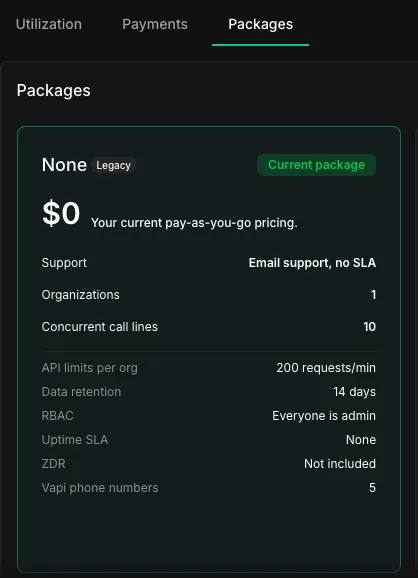
Change your Success Package
An upgrade increases the limits and support associated with your Success Package. A downgrade reduces them. Before you confirm a change, the Dashboard shows when it takes effect and any amount due.
Upgrade to Core or Pro
Buy Core or Pro directly from the Dashboard when you need more support, capacity, or service commitments.
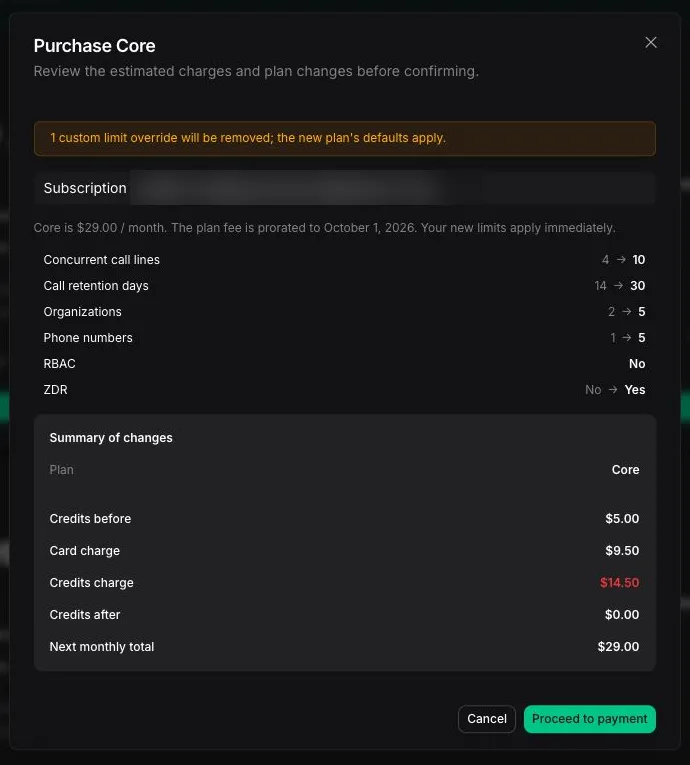
Your new package limits apply after you complete the purchase.
Move to Premier
Premier has custom pricing and terms, set with our sales team.
Downgrade or remove a Success Package
Move to a lower Success Package when you need less support or capacity. You can also remove your Success Package and continue with Usage only. The Dashboard shows when the change takes effect before you confirm it.
You might need to reduce capacity before moving to a package with lower limits. For example, you cannot move to a package that supports fewer organizations than your subscription currently contains. See Manage organizations and capacity.
Start the downgrade
In the Packages tab, select a lower Success Package, or remove your current package to continue with Usage only.
Buy capacity add-ons
Capacity add-ons increase a specific entitlement without changing usage-based billing or your Success Package:
- Concurrent call lines shared by all organizations in the subscription. Each line adds one simultaneous call on top of your subscription’s included concurrency. All inbound and outbound calls share this capacity. A campaign’s Max concurrency setting limits that campaign, but it does not reserve additional call lines.
- Additional organizations in the subscription, beyond the number your package includes. This add-on is not available on legacy pricing.
Review the recurring charge and effective date before confirming an add-on purchase. You cannot reduce an add-on below the capacity currently in use. See call concurrency for how shared capacity works.
Open capacity add-ons
In Billing & Payment, select the Packages tab. Under Add-ons, find the Capacity section.
Buy compliance and data add-ons
Compliance and data add-ons change how Vapi handles data for an organization. HIPAA and 60-day data retention are available with any package. Zero data retention (ZDR) is included in Core and Pro, and is not available as an add-on on Usage only.
Open compliance and data add-ons
In Billing & Payment, select the Packages tab. Under Add-ons, find the Compliance & data section.
HIPAA compliance requires a signed BAA and compatible providers. See HIPAA compliance for requirements and data-handling behavior.
Billing arrangements
The Dashboard shows the payment method, amount due, and renewal details before you confirm a purchase. Add-ons are charged to your Vapi credits on the first day of each month. See How credits work. For invoiced subscriptions, including Premier, contact your account team. Purchase methods depend on your billing arrangement.