

Hang Up tool quickstart
Use this quickstart to create and test an assistant that ends a call with the Hang Up tool.
What you’ll build
An assistant for the Vapi hardware store that answers a caller’s question about opening hours. When the caller has nothing else to ask, the assistant calls the Hang Up tool, says goodbye, and ends the call.
Prerequisites
- A Vapi account
- A Vapi API key for the cURL steps
1. Create the Hang Up tool
Dashboard
cURL
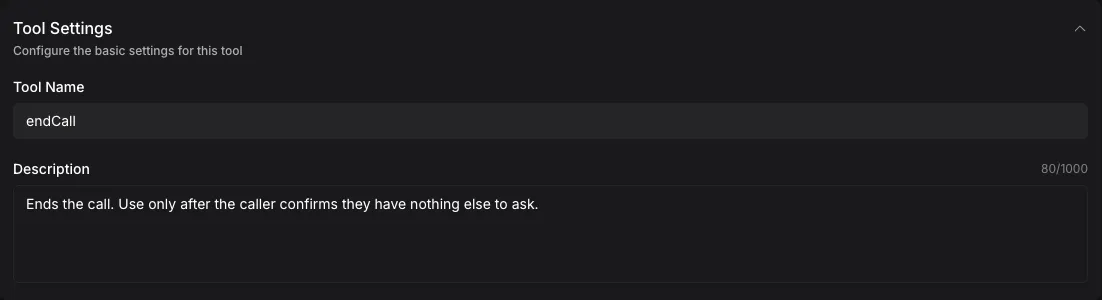
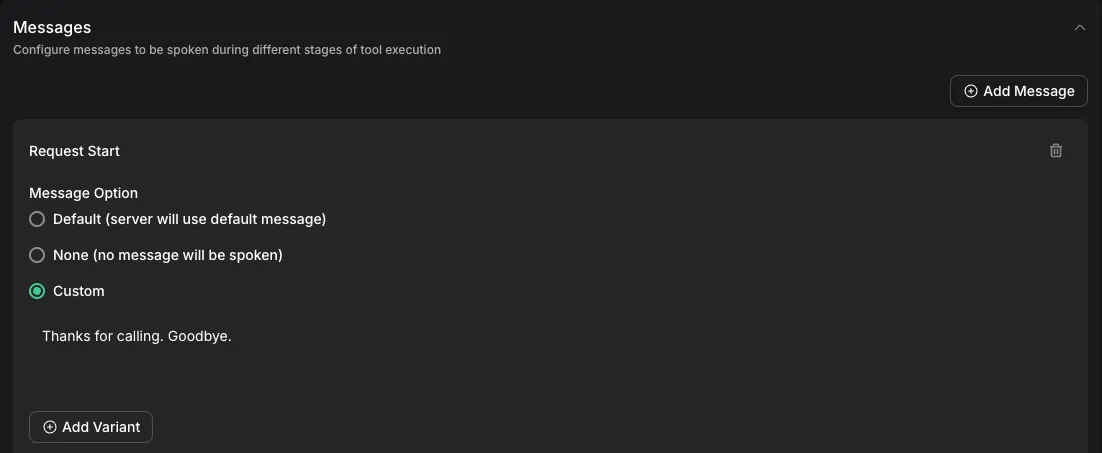
Configure the tool
Under Tool Settings, enter the following values:
Replace the default name, end_call_tool, with endCall. The system prompt refers to the tool by this name.
2. Create the assistant
Use this system prompt in either method:
Dashboard
cURL

3. Talk to the assistant
In the Dashboard, open the Vapi Hardware Store assistant and select Talk.
- Ask when the store opens on Saturday.
- When the assistant asks whether you need anything else, ask whether it is open on Sunday.
- When it asks again, say no.
The assistant should answer both questions and stay on the call after your follow-up. After you say no, it should say “Thanks for calling. Goodbye.” and end the call.
4. Check how the call ended
Select Logs, then open the call. See Call logs. The ended reason should be assistant-ended-call. Through the API, check endedReason on the call.